AWS Series #1: Network Services

For the first article in the AWS Services series, I want to discuss available network services, providing some practical examples based on my personal notes. Please feel free to reach out if you have any suggestions/questions for me : D
Virtual Private Cloud (VPC)
Service allows you to create resources, databases, and load balancers in a private virtual network environment.
Private cloud refers to companies building and simulating services of large providers (also known as hyperscale cloud providers).
Deploy AWS resources into a virtual array that you have defined.
💡 Notes:
Your AWS Cloud Account has an unique 12-digit ID
(This string is considered as sensitive information)Choose Region: e.g., Singapore (prioritize latency when serving customers)
Service availabilityPricing(Regions established longer may have cheaper service prices due to specific reasons or cheaper land costs)Cost(choose a region close to your users)
Typically, a Region will have 3 Availability Zones (AZs) (simplified here to 2 AZs for the examples)
A VPC is located within a Region, and when creating a VPC, you need to declare an IPv4 CIDR block (mandatory) and optionally IPv6.
Limit of 5 VPCs per AWS Region (per account).
Commonly used to separate environments.
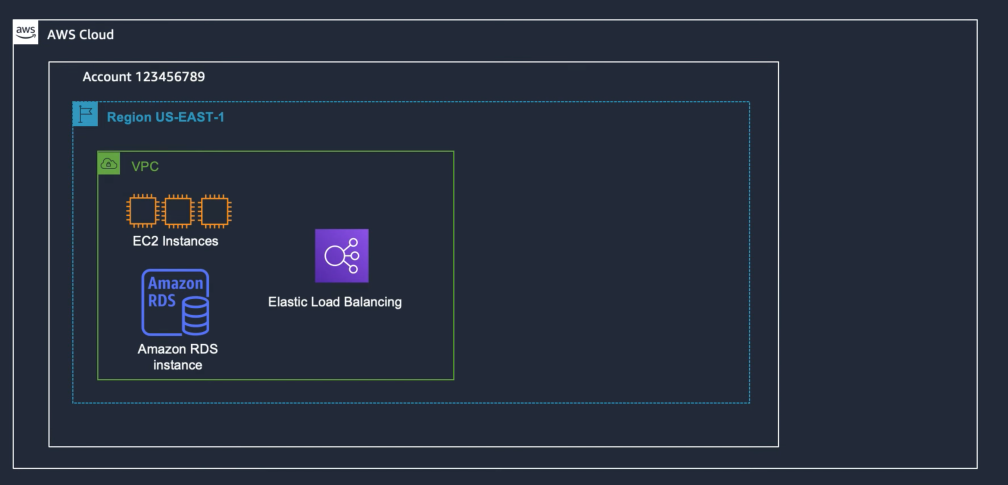
When creating a VPC, only services within that VPC can interact with each other; resources outside cannot access it. There are services outside the scope of the VPC.
Example 1: We have a 3-tier web apps running on EC2 (EC2, RDS, and ELB are in scope of VPC)
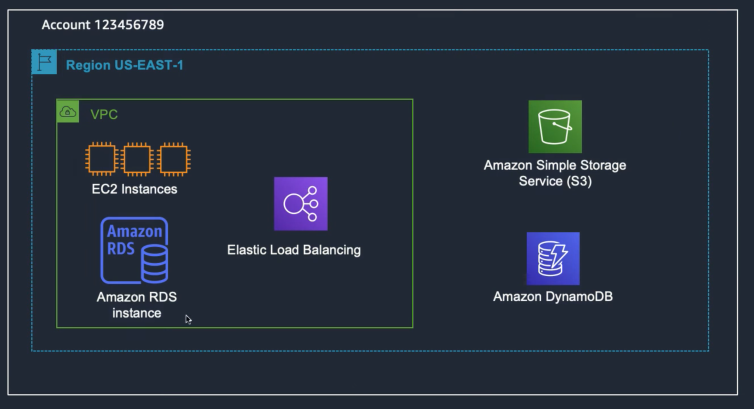
Storage services have services outside the scope of the VPC: S3, DynamoDB (Regional).
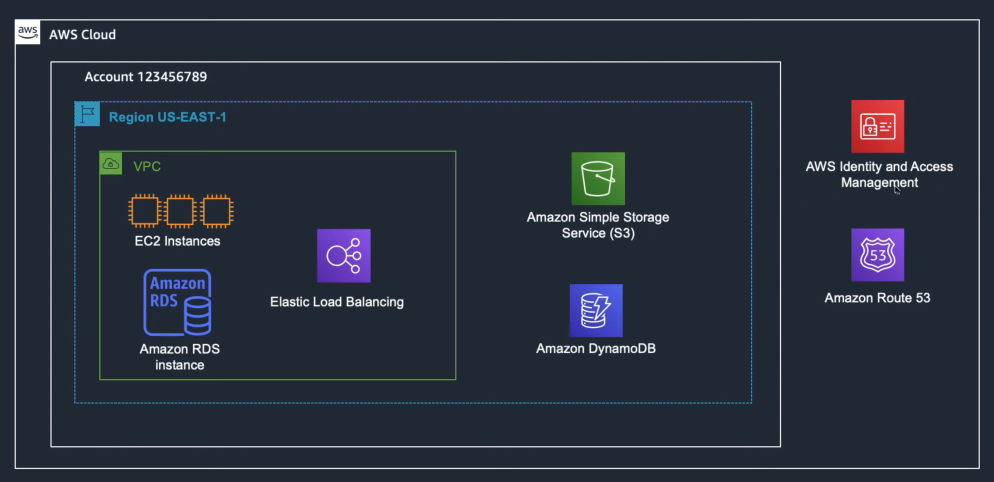
There are services outside the Region which are more specific within use cases.
Example 2: Take a look at the picture below. What is the architecture of this VPC?
(Assume that we have more than one environments: Production / Dev / Test / Staging)
- Note: If you want resources to be completely separate, you can separate them into multiple AWS accounts; multiple VPCs won't solve this.
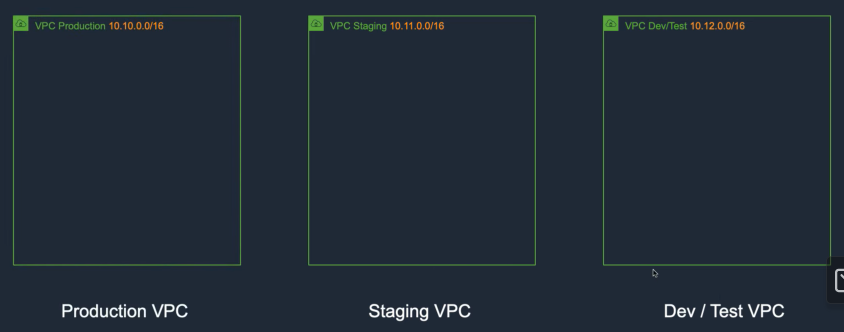
Allows creating multiple virtual networks and dividing these networks into subnets.
VPC Subnet is located in a specific AZ.
When creating a subnet, specify the
CIDR (Virtual Private Cloud Classes Inter Domain Routing)for that subnet, which is a subset of the VPC CIDR block.
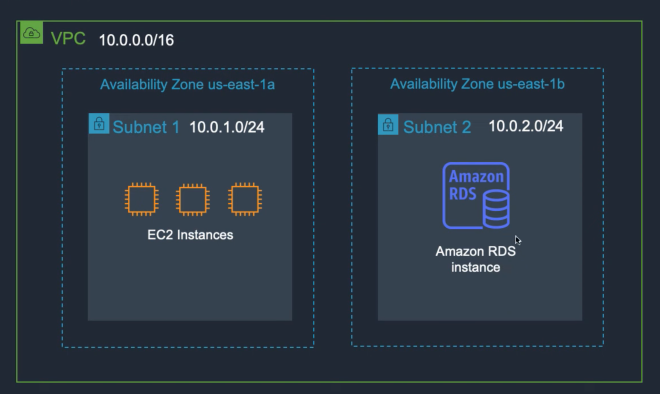
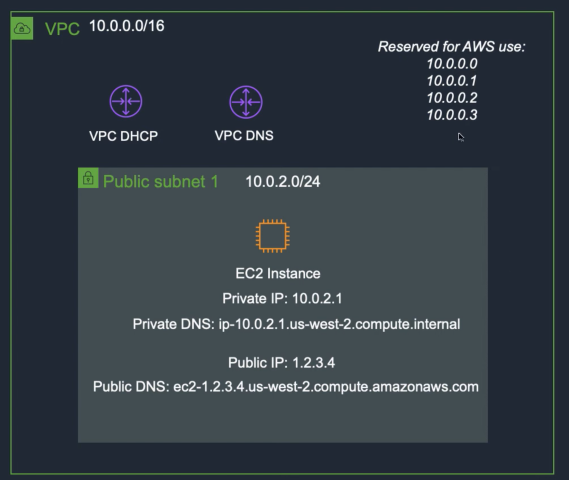
IP Addresses Reservation:
In each Subnet, AWS reserves 5 IP addresses. For example, if the subnet has a CIDR of 10.10.1.0/24.
One for network (10.10.1.0
One for broadcast address (10.10.1.255)
One address for routing (10.10.1.1)
One address for DNS (10.10.1.2)
One address for future function (10.10.1.3)
Public Subnet: 10.10.1.0/24 (resources or virtual servers placed in the public subnet can access the Internet)
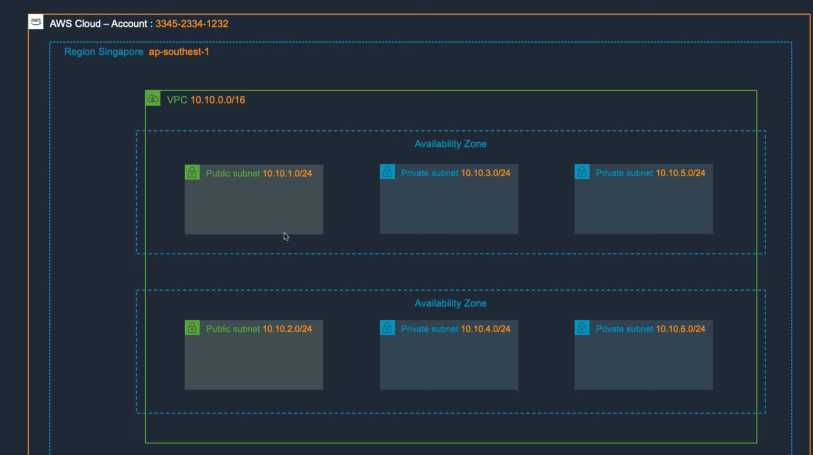
How to create a public subnet:
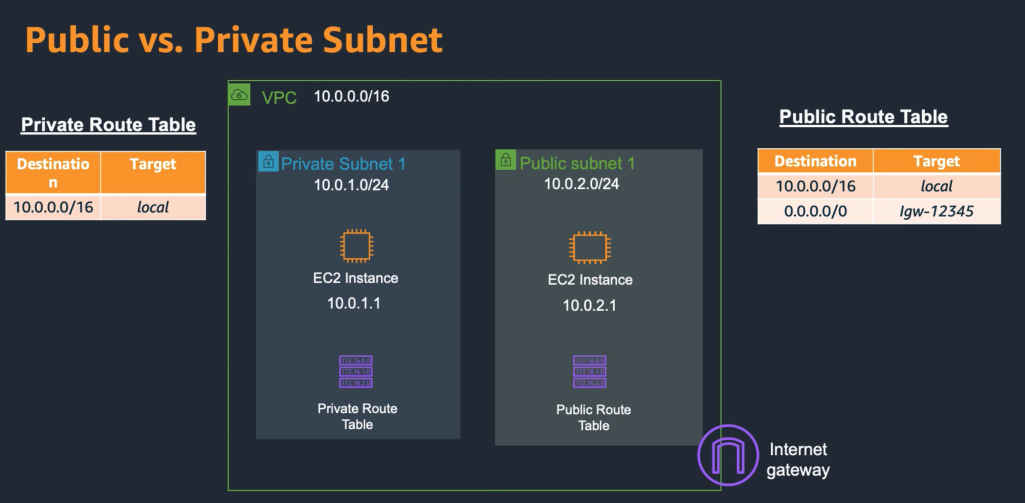
Route table: Defines the routes for the network.When creating a VPC, AWS will create a
Default Route Table(cannot be deleted and contains only one route that allows all subnets in the VPC to communicate with each other).Route table will be assigned to a SubnetWe can create a
Custom Route Table, but cannot delete the default route (VPC CIDR - Local)Then assign
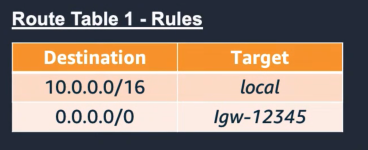
Internet Gatewayfor the Public Subnet’s Route table(Destination 0.0.0.0/0 with Target is the created Internet Gateway)
Virtual Private Cloud (VPC) - Elastic Network Interface (ENI)
Elastic Network Interface (ENI): An ENI is a virtual network card that can be transferred to other EC2 instances.When a server is created, it has an IP address, but this address is not directly assigned to the server resource (it is assigned to the network card
ENI).When transferring to a new server, the virtual network card maintains:
Private IP Address
Elastic IP Address
MAC Address
Elastic IP Address (EIP):
- For public subnet to have internet connection, we have to assgin a public IP address
EIPis a static IPv4 address that can be associated with a network interface.Charges apply when not in use (Keep this in mind to avoid waste).
Example 3:
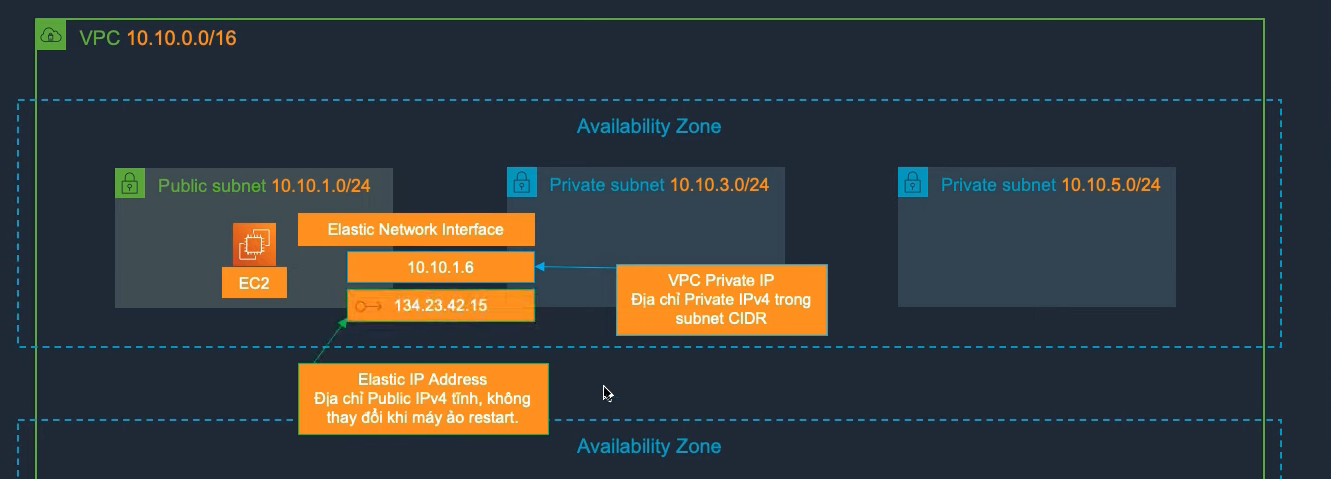
When creating an EC2 instance, the virtual machine will have an ENI, and the VPC will assign an IP address to that ENI.
Next, there will be a second IP address (this address is an
Elastic IP Address, a static IPv4 address that does not change when the virtual machine restarts).
VPC Endpoint:
- Allows us to connect resources within the VPC to supported AWS services (
AWS PrivateLink- through AWS's private network) without needing an Internet connection.
Types of Endpoint:
There are two types:
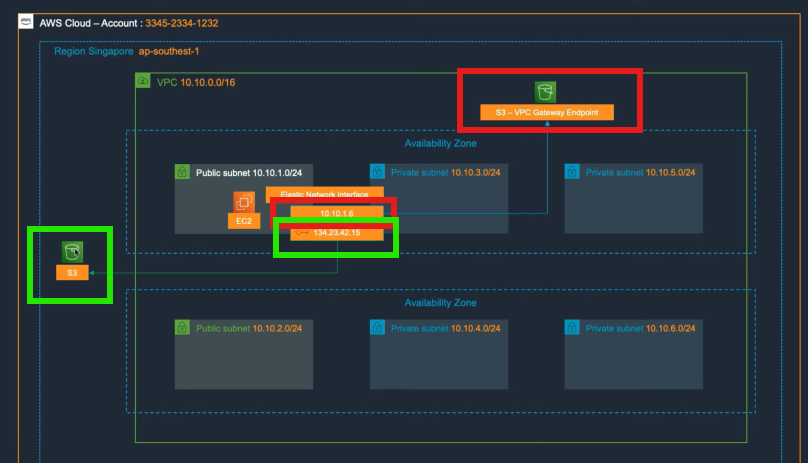
Interface Endpoint:Uses anElastic Network Interface (ENI)in the VPC with a Private IP address to connect to a supported service.Gateway Endpoint:Uses a route table to route to the endpoint of a supported service (S3 and DynamoDB).
Scenarios: We have services out of the scope of the VPC, such as S3, which are outside the VPC (independent) → No need to create a VPC, just create a public IP address to access the Internet to connect with it.
Connecting to the Internet is slow and costly.
Outbound costs (charged), inbound costs (free).
Question: Why is this service created by AWS but not supported, and why not provide an internal path?
→ Created the Gateway Endpoint feature
VPC-Internet Gateway:
Creating a server in a public subnet → the purpose is for that server to access the Internet. Assigning an IP address is not enough → Create an Internet Router.
Internet Gateway:A component of the VPC that can scale horizontally (scale out) allowing EC2 Instances in the VPC to communicate with the Internet.Managed by AWS, no need to configure
autoscaleorhigh availability.Cannot connect remotely
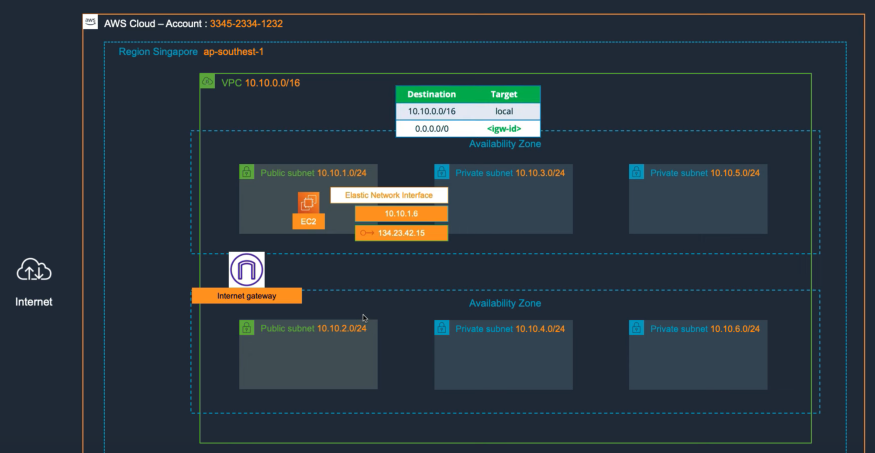
How to assign Internet Gatewan ay to a Public subnet’s route table:
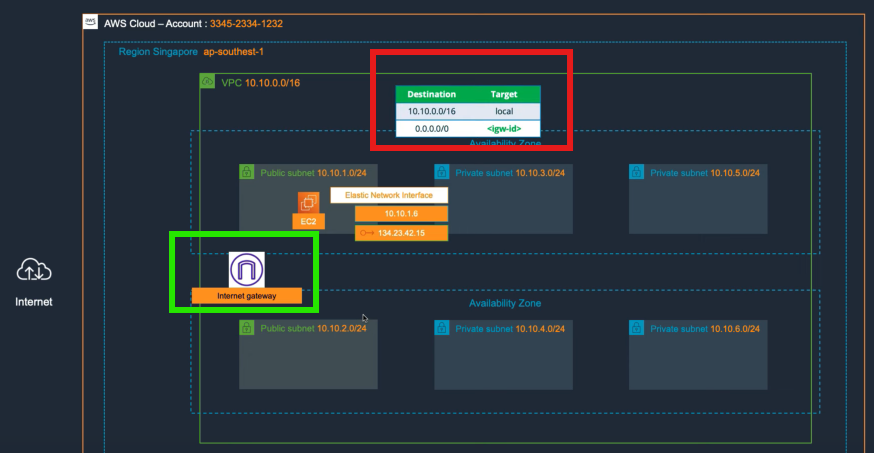
Step 1: Create an Internet Gateway
Step 2: Create a custom route table
Includes 2 default routing components (local - current network range).
Custom routing 0.0.0.0/0 → Target
<igw-id>🌐 of the Router (Gateway).
Step 3: At this point, the virtual server can access the Internet Gateway
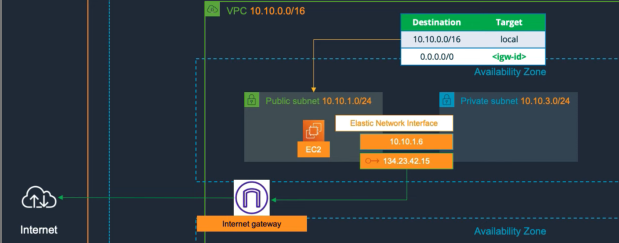
Question: Typically, virtual servers are placed in a Private Subnet → still want to access the Internet, how to do it?
VPC NAT Gateway:
- NAT Gateway allows
EC2 instances in a subnet to access the Internet or other AWS services.It only accepts outbound connections and does not accept inbound connections.
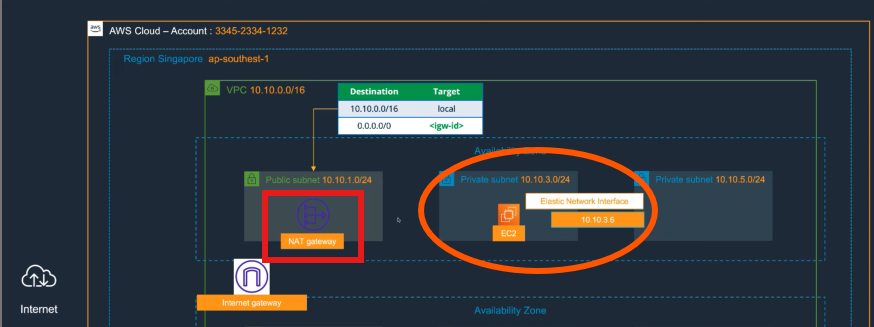
Case: The server is in private subnet and has a private IP.
Step 1: Need to create a NAT Gateway in the public subnet.
Step 2: Configure the route table (for traffic to go through the NAT Gateway (using public IP) → Internet Gateway → Internet
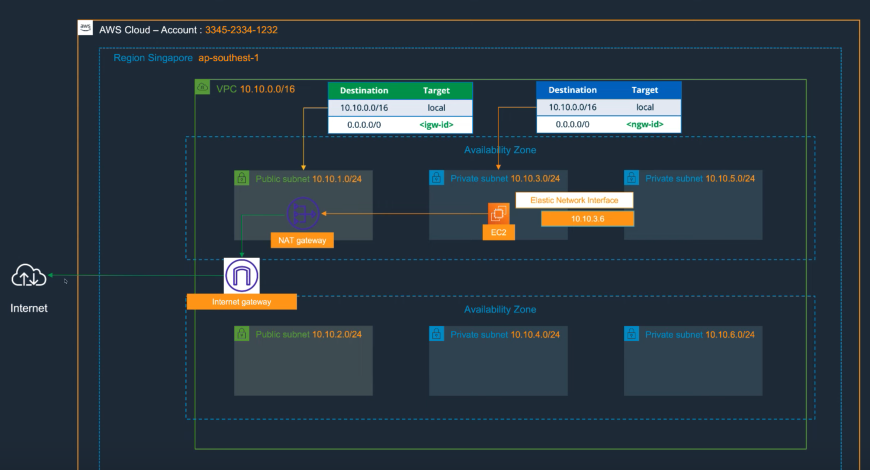
In practice, servers will not be in the public subnet anymore but will be in the private subnet.
Or the server needs to download patches from the network or call external APIs (e.g., an app needs to know the current gold price).
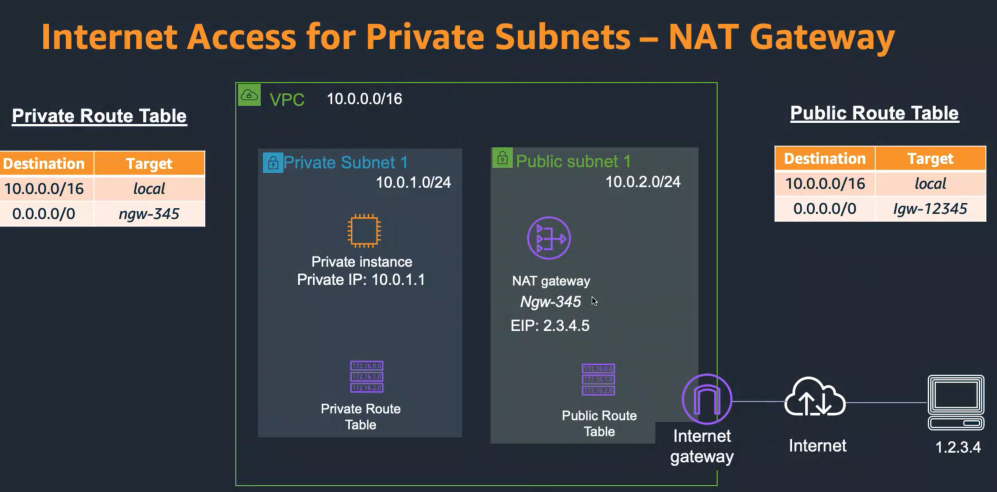
Question: With the current architecture, the server in the public subnet can connect with servers in the private subnet → how to make the server in the public subnet only connect with the server in private through a specific port → firewall (Security Group).
VPC - Security Group:
Security Group (SG): is a virtual firewall with stateful properties that helps control inbound and outbound traffic for AWS resources.
Assign to virtual network card:
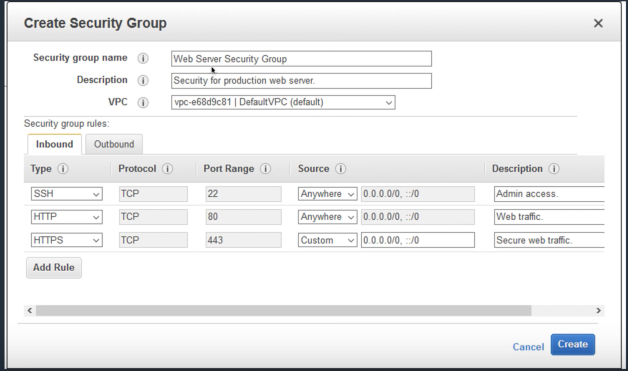
Rule: Restricted by protocol, source address, port, or another security group.Only allows allow rulesSGis applied toENI (Elastic Network Interface)
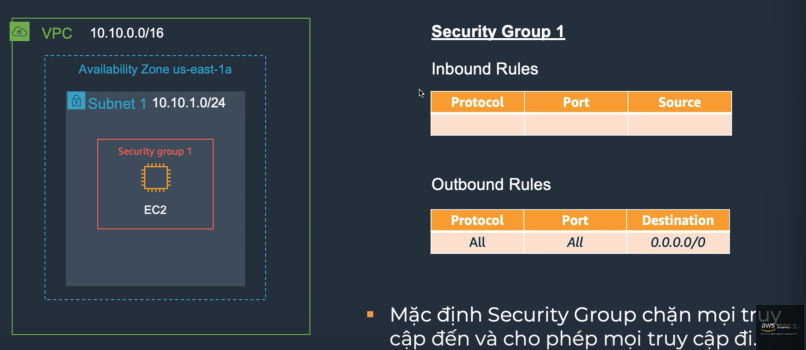
- By default, Security Group blocks all inbound traffic and allows all outbound traffic.
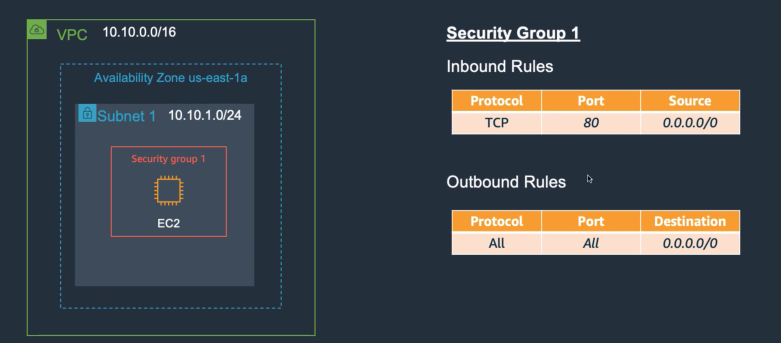
- If left as default, remote access to the VM is not possible (check configuration).
Example 4: Security Group cho web server
Example 5: Multiple Security Groups
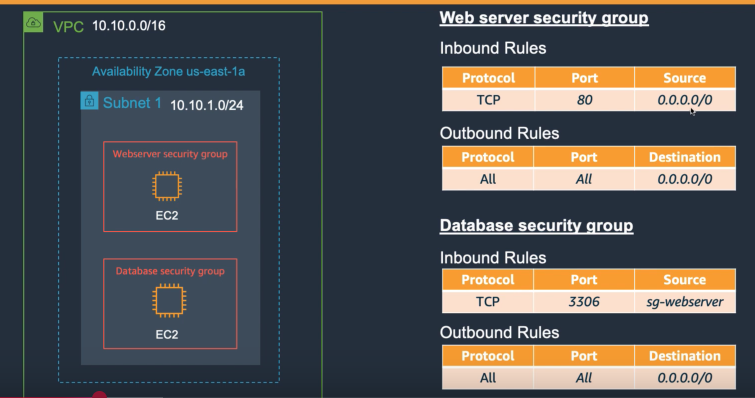
DataBase: all ENIs applied with sg-webserver will connect to the database server
Reason why specific IPs are not used but security groups are used → in case of auto-scaling (web servers are in different AZ ranges). Instead of reconfiguring the sg-security group, it is not necessary anymore (configure once only).
VPC - Network Access Control List (NACL)
Network Access Control List (NACL)is a stateless virtual firewall that controls inbound and outbound traffic for AWS resourcesRestricted by
protocols, source address, destination addressNACL is applied to Amazon VPC Subnets → changing NACL configuration can affect multiple servers at once
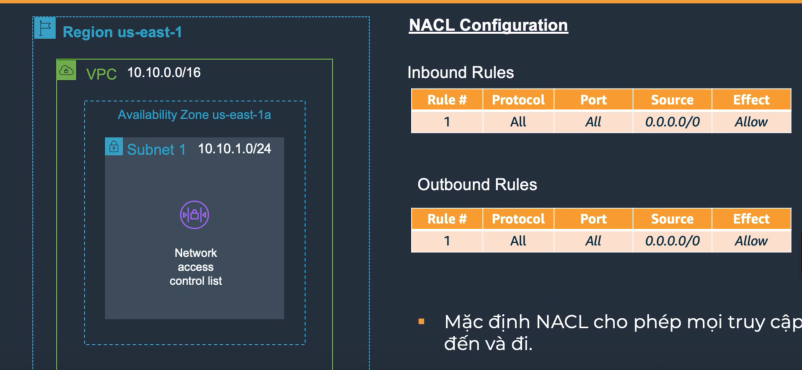
By default, allows all inbound and outbound traffic
Question: How to configure without affecting many servers, subnets → Use Security Group
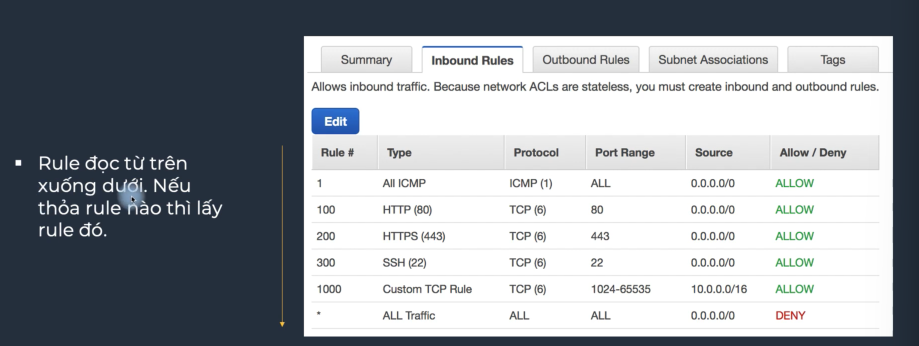
32766: the largest number of ACL.
Rules will be read from top to bottom, which rule matches, it will apply that one.
Example 6: NACL example
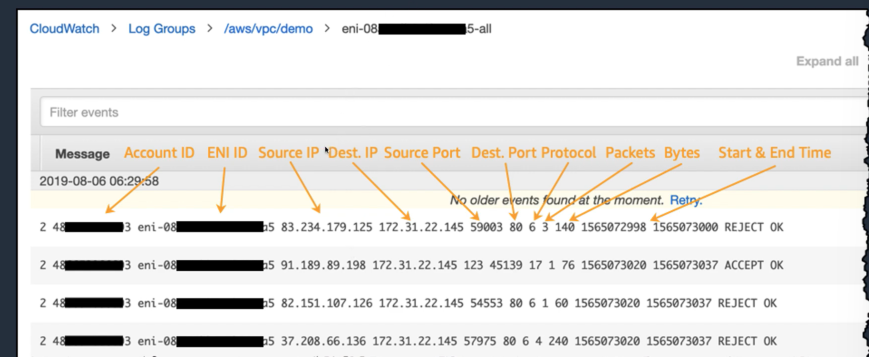
VPC-Flow Logs
Flow Logsis a feature that captures information about IP traffic going to and from network interfaces in your VPC.Log files can be published to
AWS CloudWatch LogsorS3.Does not
capture packet content.
VPC Peering & Transit Gateway:
Situation: When creating VPCs, these VPCs do not connect with each other.
VPC Peeringis a feature that helps connect two or more VPCs so that resources within those VPCs can communicate directly with each other without going through the Internet, enhancing the security of the VPC.Peeringis a 1:1 connection between two member VPCs anddoes not support transitive routingPeeringdoes not support when two VPCs have overlapping IP address spaces.
Example: We have 3 VPCs (1-2-3)
1 connects to 2
2 connects to 3
→ 1 will not connect to 3
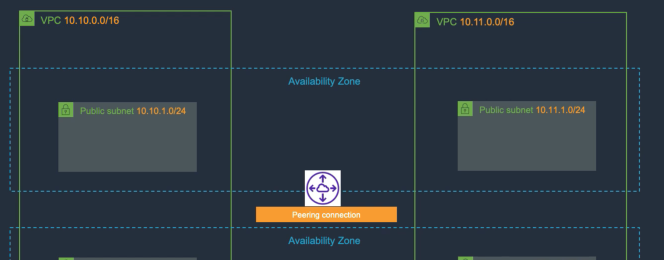
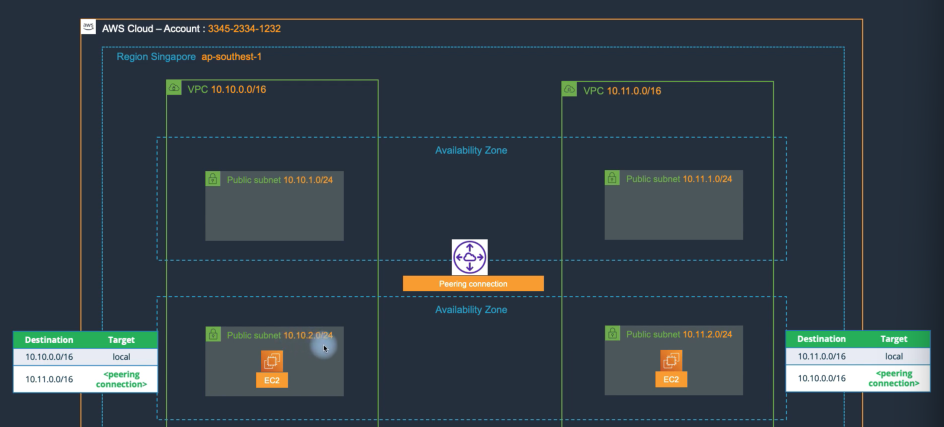
Example 7: Peering connection for One Region - 2 AZs - 2 VPCs
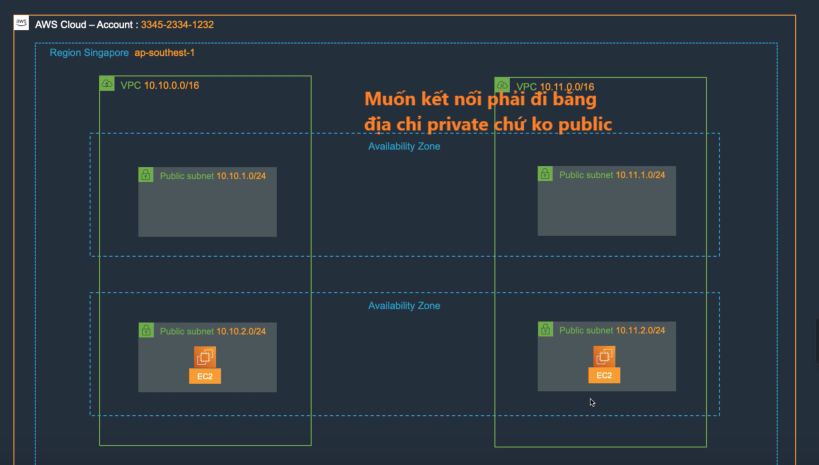
Step 1: To connect, a Peering connection is needed, but it is not yet connected.
Step 2: You still need to manually configure the route table (IP route table) for these two subnets.
Includes a default route entry and a route entry containing the destination you want to reach (similar to when we configure an IP route for routers)
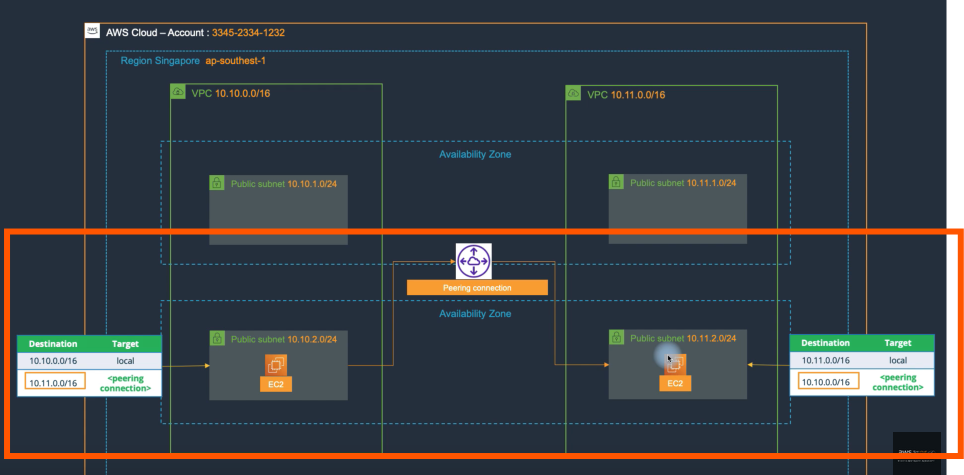
Now, the servers in the subnet below can connect with the servers in the other subnet. You can add more subnets by changing the destination address in the route table.
💡 VPC Peering supports direct connections between different Regions and Accounts.
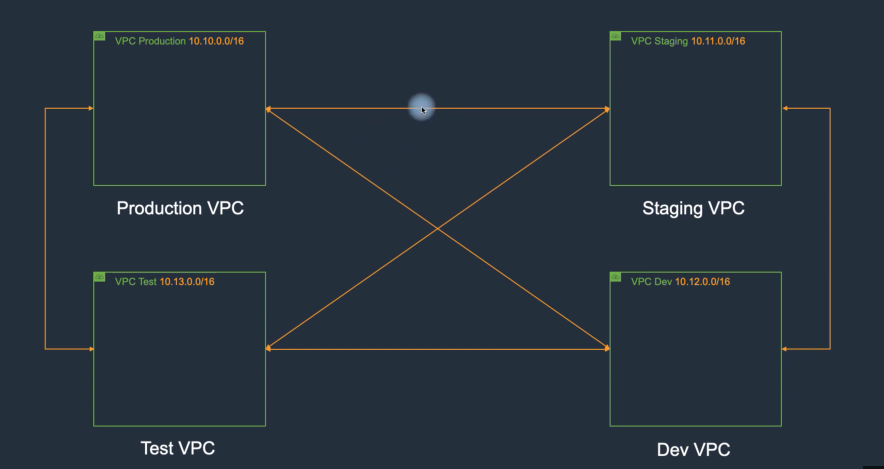
Scenario: Assuming a large scale (100 VPCs), who would manually configure static routes → TRANSIT GATEWAY
Transit Gateway:
Transit Gatewayis used to connect VPCs and on-premises networks through a central hub. This simplifies the network and ends complex routing relationshipsTransit Gateway Attachmentis a tool to assign the subnets of each VPC that need to connect to a created TGW. TGW operates at the AZ level (AZ Level)In a VPC, when a subnet in an AZ has a
Transit Gateway Attachmentwith a TGW, other subnets in the same AZ can connect to that TGW
💡 Each AZ will have a Transit Gateway even if that AZ has multiple subnets.
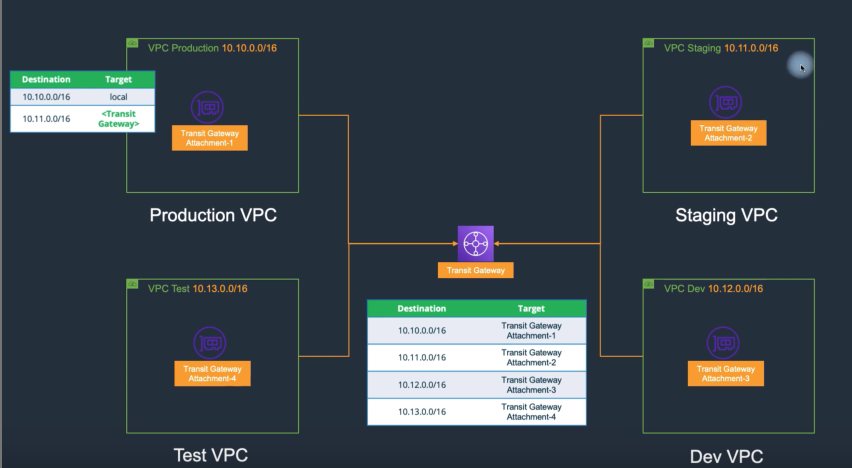
Step 1: Create a Transit Gateway and Transit Gateway Attachments for each subnet.
Step 2: Configure the route table for each VPC (specify the network range needed for the attachment and transit gateway as shown).
VPN Site to Site:
The concept of a hybrid environment to establish a continuous connection between the traditional data center environment and the AWS VPC environment. Establishing the connection will require two endpoints on the AWS and customer sides
Virtual Private Gateway:Fully managed by AWS (divides into two endpoints at both ends of the AZ)Customer Gateway:The endpoint on the customer side, which can be hardware or a software appliance
Example: On-premises address is ….10.12 → Connect to AWS environment we can have …10.11 (site to site) connect, allowing communication even if the two IP ranges are different.
VPN Client to Site:
The cost is quite high, so it is recommended to use a third party.
Allows a host to access resources in the VPC.
Encouraged to use VPC Client to Site in AWS Marketplace.
Direct Connect:
A service that allows creating a private connection from a traditional data center to AWS.
Latency is about 20ms-30ms.
Direct Connectin Vietnam currently goes through Direct Connect partners and operates asHosted Connections
💡 If directly connected, it will be a Dedicated Connection
- Bandwidth through
Direct Connectcan be adjusted up/down as needed.
💡 Does not encrypt data (after connection, still need to configure VPN site-to-site for data encryption)
Elastic Load Balancing (ELB):
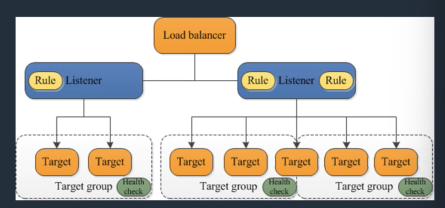
A load balancing service managed by AWS, which distributes traffic to multiple EC2 Instances or Containers.
Uses
HTTP, HTTPS, TCP, and SSL (secure TCP)Can be in a public or private subnet.
Each
ELBis assigned aDNSname and connects throughDNS. Only Network Load Balancer supports assigning a static IP
ELB has a health check feature, not sending traffic to Instances that do not pass the health check.
Includes 4 Types:
Application Load BalancerNetwork Load BalancerClassic Load Balancer: quite expensive, gradually not usedGateway Load Balancer
Sticky Session:
- A feature that allows connections to be assigned to a specific target. Ensures requests from a user in a session are sent to the same target.
💡 Necessary in cases where application servers store user state information on the server.
Operates on
Network Load Balancer,Application LB,Classic LB.ELBprovidesaccess logstorage (access logs) → use logs to analyze traffic and troubleshoot.Logswill be stored in an object storage service likeS3 (Simple Storage Service).
Example: If working on server 1, storing state information on server 1, switching to server 2 will lose the information and state of user 1 → logging in and losing information. Enable sticky session to stay on that session.
Application Load Balancer (ALB):
Managed by AWS and operates at layer 7.
Uses
HTTP, HTTPSprotocols.Supports
path-based routing (mobile/desktop will be routed to two different target groups).
Assumes the application will differentiate requests from different devices.
- Allows routing traffic to targets outside the
VPC(IP Address),EC2, Lambda, Containers (ECS, EKS).
Network Load Balancer (NLB):
NLBis a load balancing service managed by AWS → meaning no need to worry about auto-scaling.Uses
TCP, TLSSupports setting a
static IPSupports the
highest performance among LOAD BALANCERS, capable of handling millions of requests.Allows routing traffic to targets outside the
VPC (IP address),EC2, Container (ECS, EKS).
Classic Load Balancer (CLB):
Classic Load Balancer (CLB): managed by AWS (Layer 4 & 7).Uses protocols:
HTTP, HTTPS, TCP, TLSHigher cost compared to
ALBandNLB.Fewer advanced features than
ALBandNLB, currently less usedAllows routing traffic to EC2
Gateway Load Balancer (GLB):
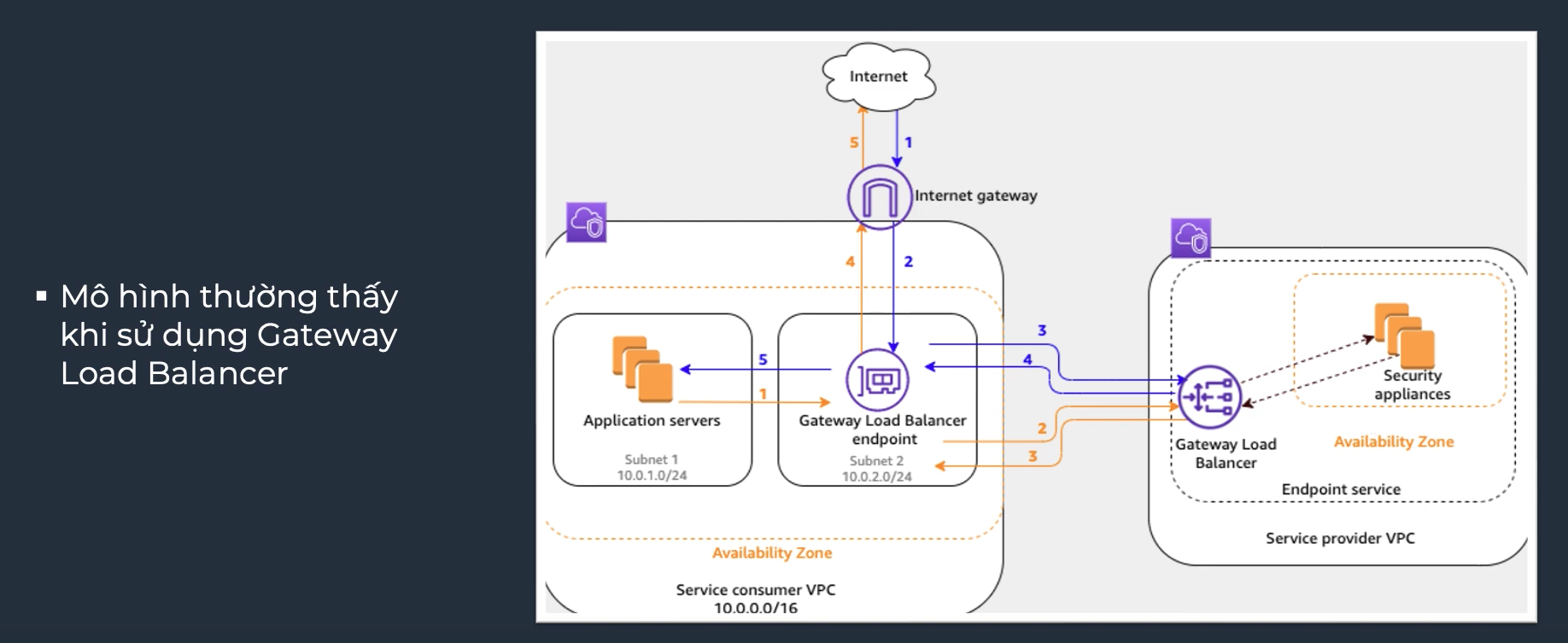
GLBis managed by AWS, operates at Layer 3GLBlistens to all IP packets and forwards them to the specified target group.Uses
GENEVEprotocol on port 6081.Allows routing traffic to virtual appliances supported by AWS.
Route Tables - Internal VPC Traffic:
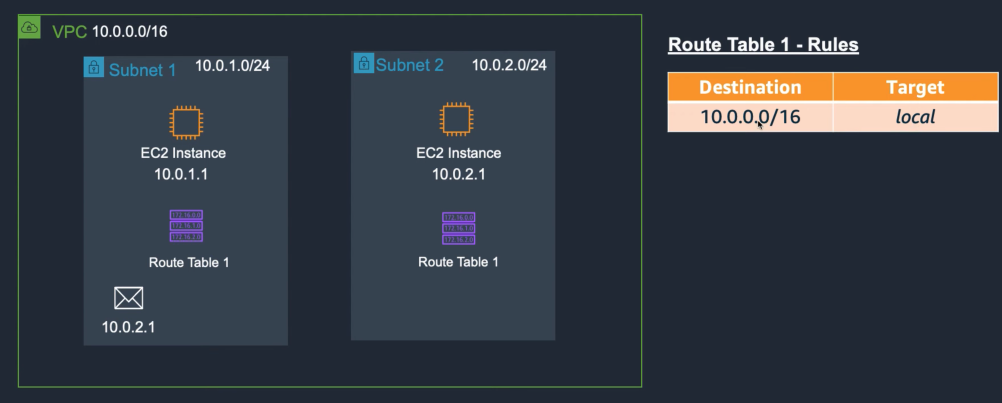
When creating a VPC, there will be a default route table.
Destination:the endpointTarget:the path (local: the IP address assigned to the VPC).
The image above describes the essence here is that two entities can communicate with each other, but that’s not enough → we want to have customers
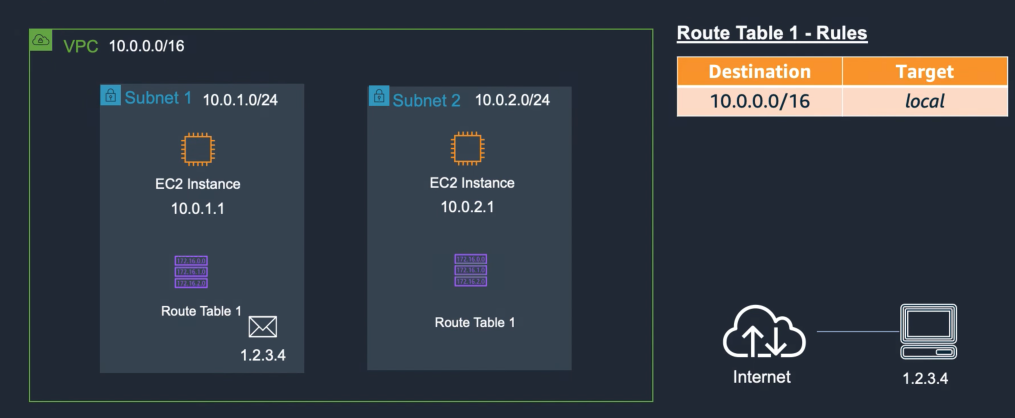
- The end-user can connect to your machine.
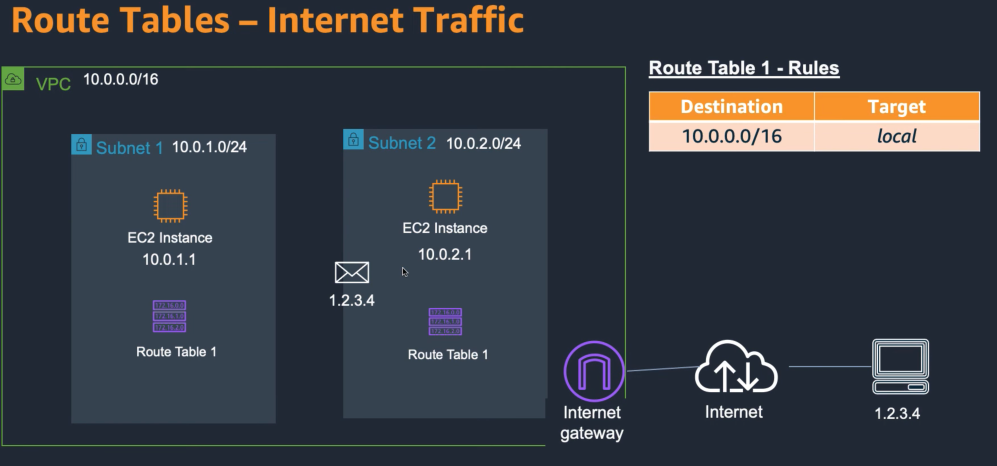
Create an internet gateway (like a virtual router managed by AWS → no need to worry about bandwidth) → Configure the route table