AWS Series #5: Lambda and API Gateway

I utilized slides from AWS to enhance my explanations of the topics, strictly for educational purposes and without any commercial intent. I used Gemini to create images alongside the original file. For any related concerns, feel free to contact me via my LinkedIn profile.
Let's talk about the history of serverless:
In the early stages, when we had hardware devices, building applications on physical servers took a lot of time.
Gradually, applications were built using containers (such as Docker). To manage multiple Docker containers, Kubernetes could be used. This opened up many opportunities because microservices required fewer physical resources, and applications could be tested and built more easily. They could be turned off when not needed and activated when necessary. (However, with containers, we still needed to manage the infrastructure.)
Later, when Lambda was announced, the concept of serverless emerged. Essentially, it's a small piece of code used to run a particular solution. However, infrastructure management is handled by AWS, which greatly supports scaling up according to application needs.
What is Serverless?
Firstly, you don't have to provision and manage your infrastructure
Automatic scaling
Pay for what you use
Highly available and secure
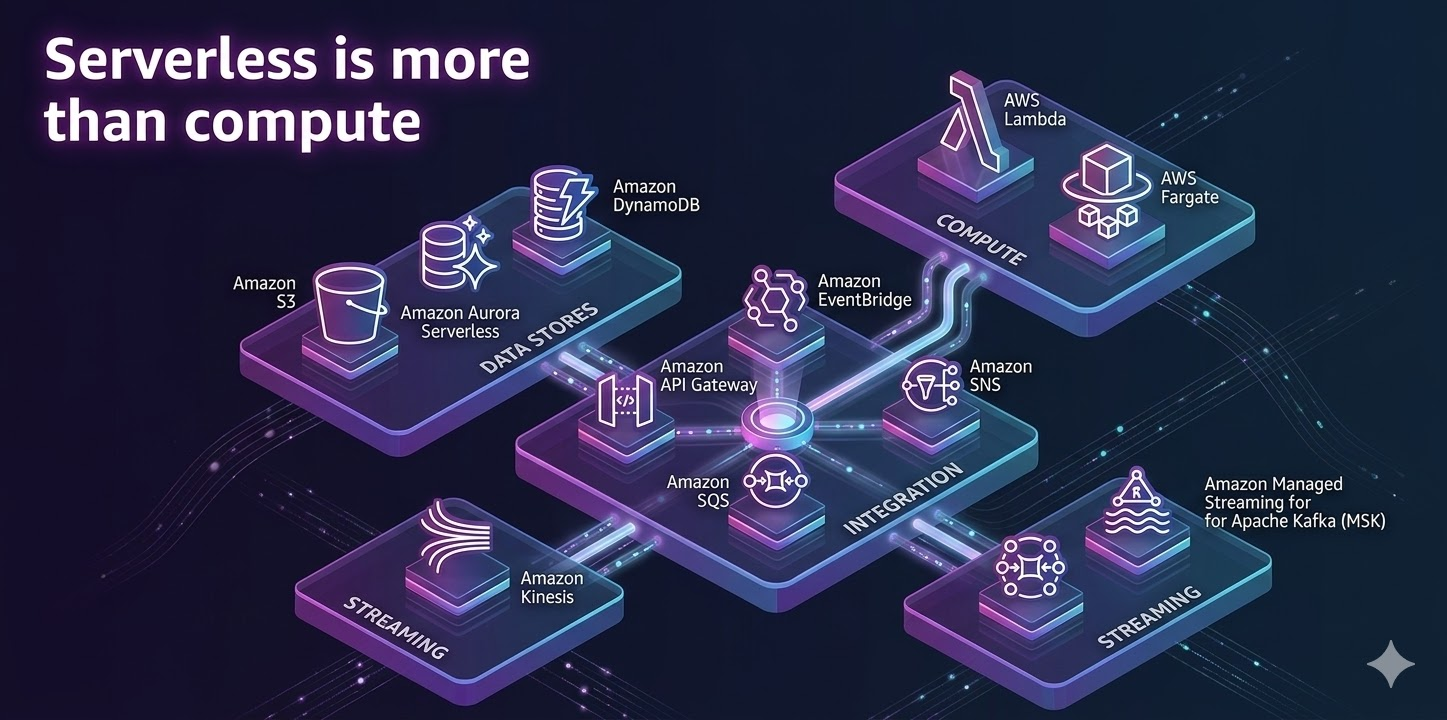
Currently, following the development trend, serverless is no longer limited to Lambda. In the past, when mentioning serverless, people often only thought of Lambda.
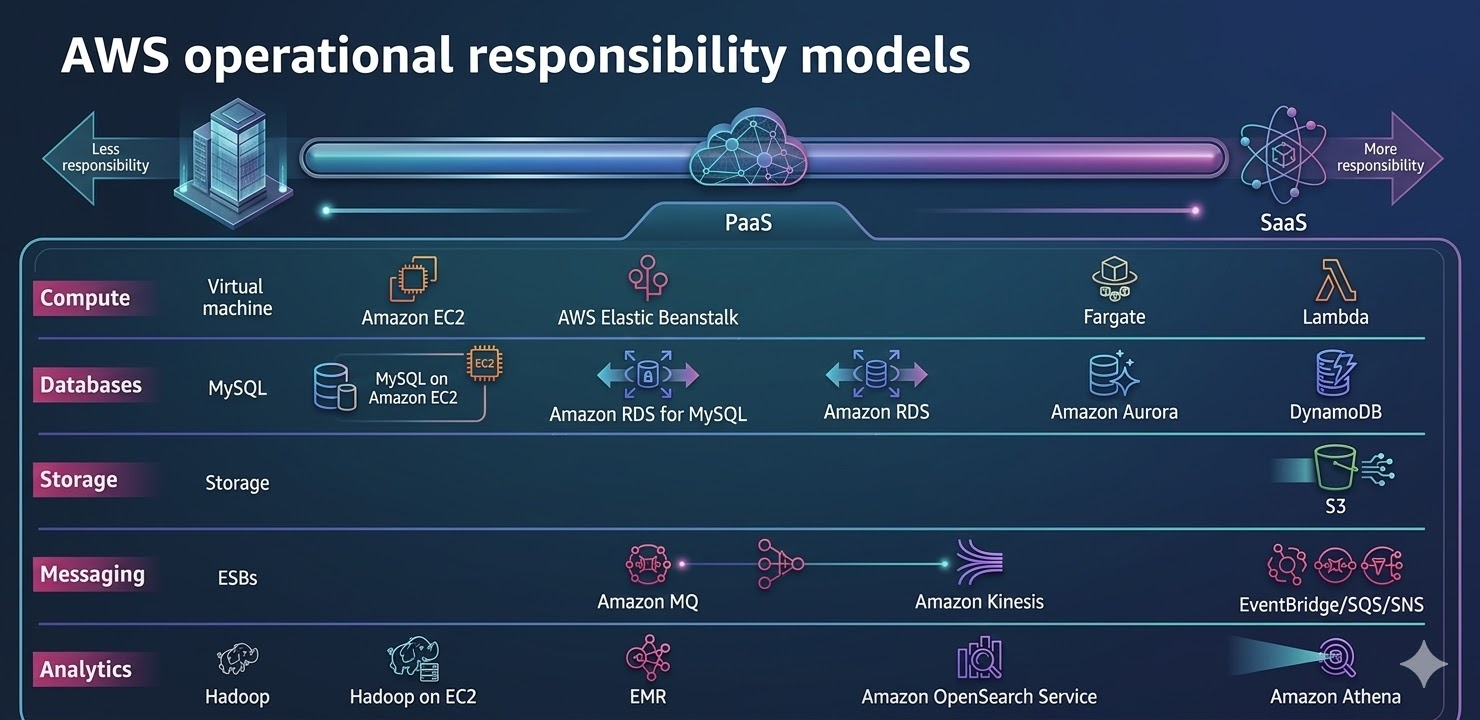
The image above describes AWS services; the more you move to the left, the more physical infrastructure is needed, while moving to the right involves services that don't require infrastructure management.
High Level View:
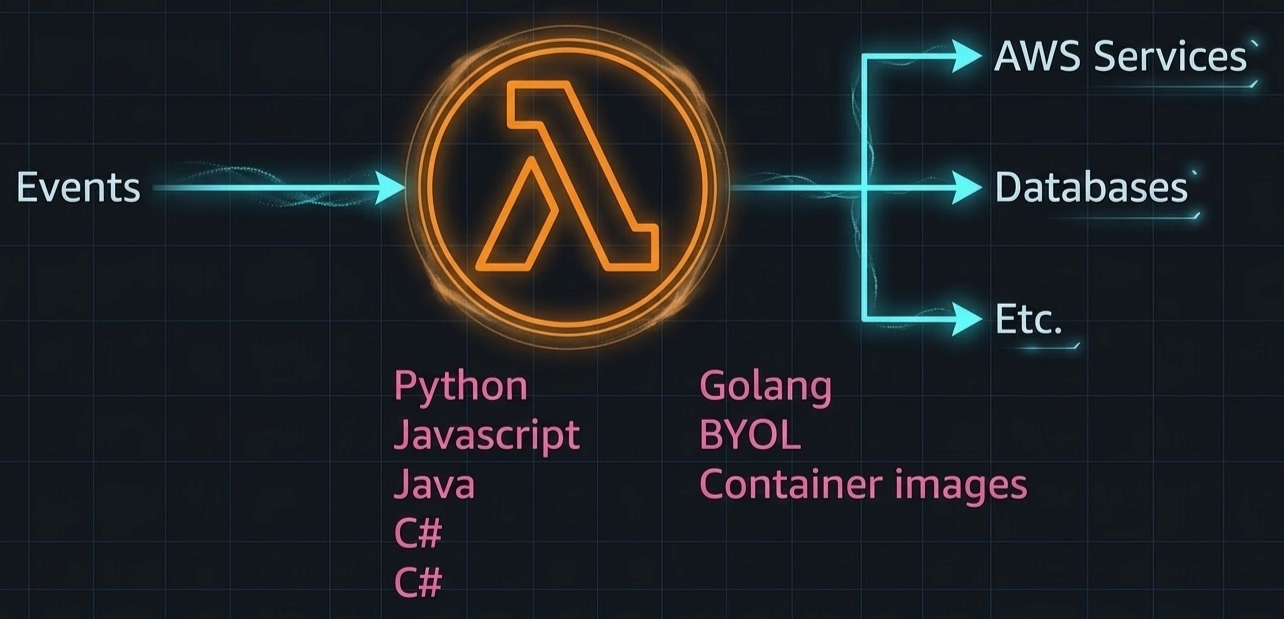
Lambda is just a function code that can be written in various languages of your choice.
Lambda receives events from multiple sources to process and then sends results to different destinations depending on the case.
Supported languages: Python, JavaScript, Java, C#, Golang, BYOL, Container images
Customer View:
You need to consider who in your application is concerned with Lambda.
No need to configure firewall or network
When configuring Lambda, keep in mind:
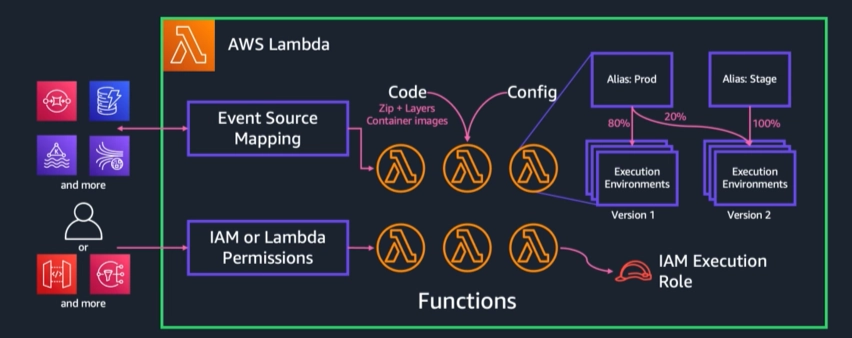
Event Source Mapping: a service triggers events sent to Lambda for processing (can be triggered from API calls, message queues)
You can upload a zip file for Lambda to extract code
Lambdacan be assigned IAM Roles and Permissions to access and interact with specific services
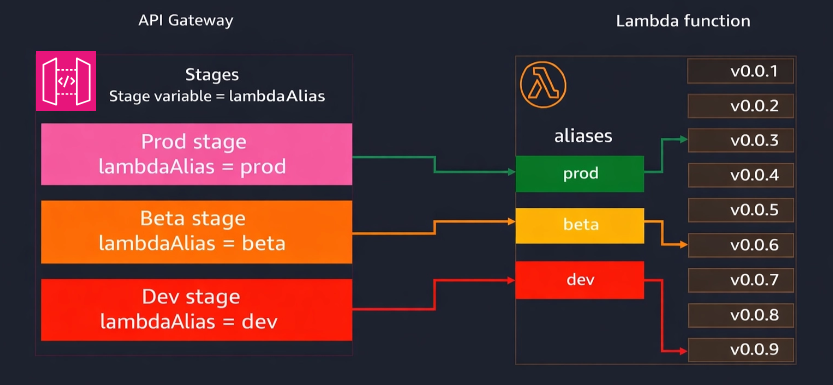
You can configure multiple environments for Lambda, for example, in canary deployment, you can create multiple Aliases for different environments, splitting traffic, such as 20% running in production and the remaining 80% in the test environment
Version:Lambda can have multiple versions, and you can roll back to a previous version if needed
Question: When deploying on Lambda, is my function shared with other customers?
The answer is no, because each Lambda is created in a completely independent environment, built within AWS's infrastructure sandbox
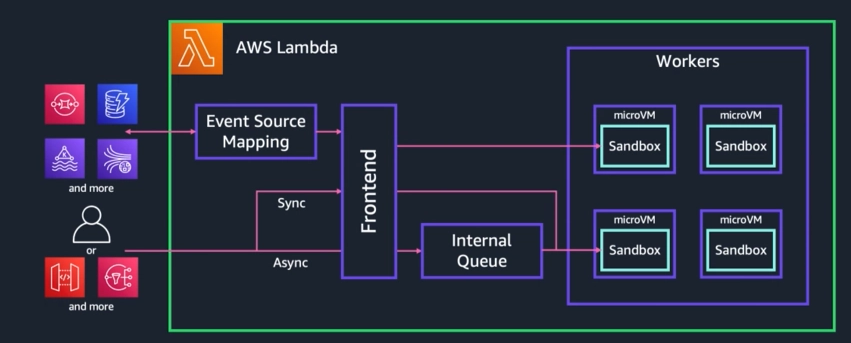
Invocation Modes:
To execute Lambda, there are three methods: Event Source Mapping, Synchronous Request, and Asynchronous.
Synchronous: For synchronous, send a request and wait for the response.
Asynchronous: Send a request without waiting for the result.
Event Source Mapping: Lambda is mapped to event sources (when an event changes, it triggers Lambda to run)
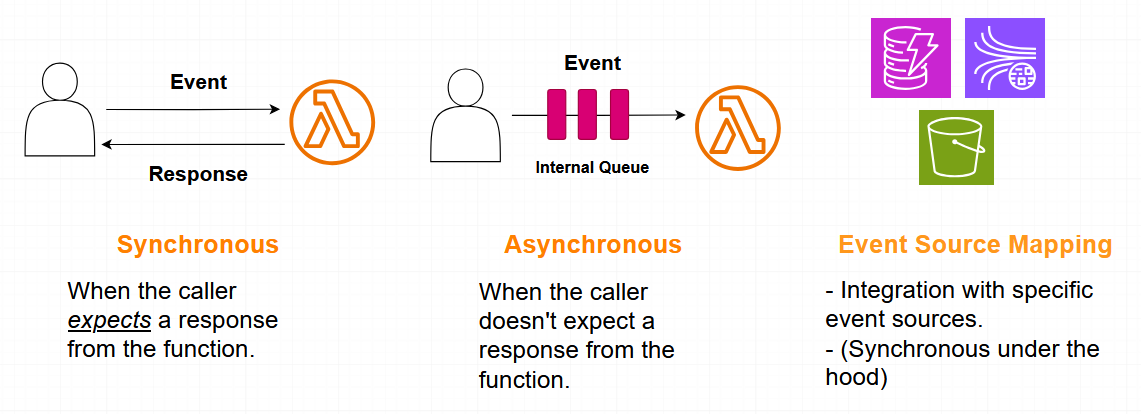
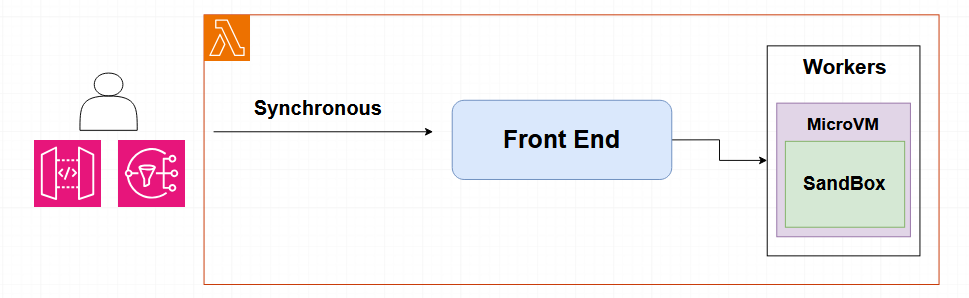
Synchronous invocation mode:
Useful when an immediate response from the function is needed; errors are sent back to the caller or throttles are sent when you hit the concurrency limit.
There are two scenarios here: a timeout when exceeding 15 minutes, or throttling when the number of functions configured is around 100, but calls reach 200.
Flow of synchronous request:
The request is sent to Lambda's frontend service, which then authenticates to see if the user is authorized to use Lambda and checks if there are any quota limits.
If everything is fine, it will allocate a suitable VM and initialize the configuration to execute the code.
Asynchronous invocation mode:
- The caller only receives acknowledgment from the Lambda service, supporting retries (up to 2 retries, or 3 total invokes, including destinations and DLQ).
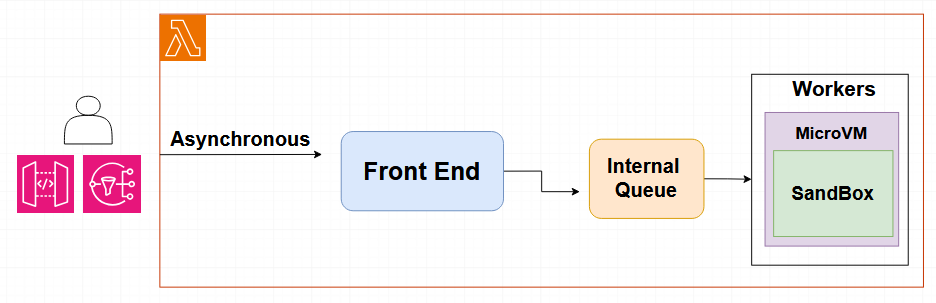
Flow of asynchronous request:
Go through the front-end → authenticate → place in queue (processing can take up to 6 hours) → when a request is made → Lambda polls the queue (if an error occurs, it can be sent to a dead-letter queue for handling)
An asynchronous request can integrate with SNS and S3 to handle transactions through a queue.
Event Source Mapping:
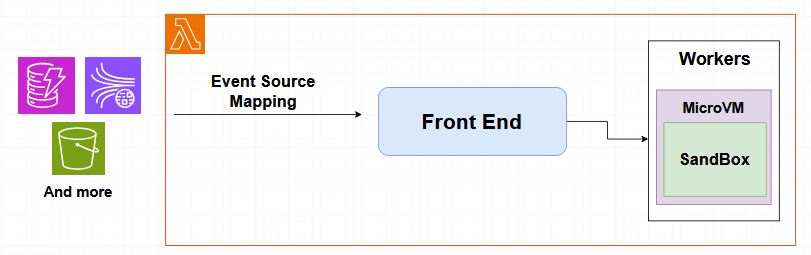
Event source mapping is quite similar to Async → poll data → process (the difference is it allows batch processing, stacking up to a certain number before Lambda processes it).
For example, once there are 10 messages, Lambda can run.
Additionally, you can set up event handling, sending errors to a dead-letter queue for processing.
Note that to optimize costs, you don't need to call continuously; you can wait for enough messages to process instead of handling each one individually.
Lambda Function Isolation:
Each function runs in a dedicated sandbox
Built on purpose-built virtualization technology: Firecracker
Provides enhanced security and workload isolation
AWS maintains the execution environment and runtime
Patching, etc.
AWS does not maintain a runtime for custom runtimes or container-packaged functions
In the case of using libraries or runtime packages, you need to take care of them yourself
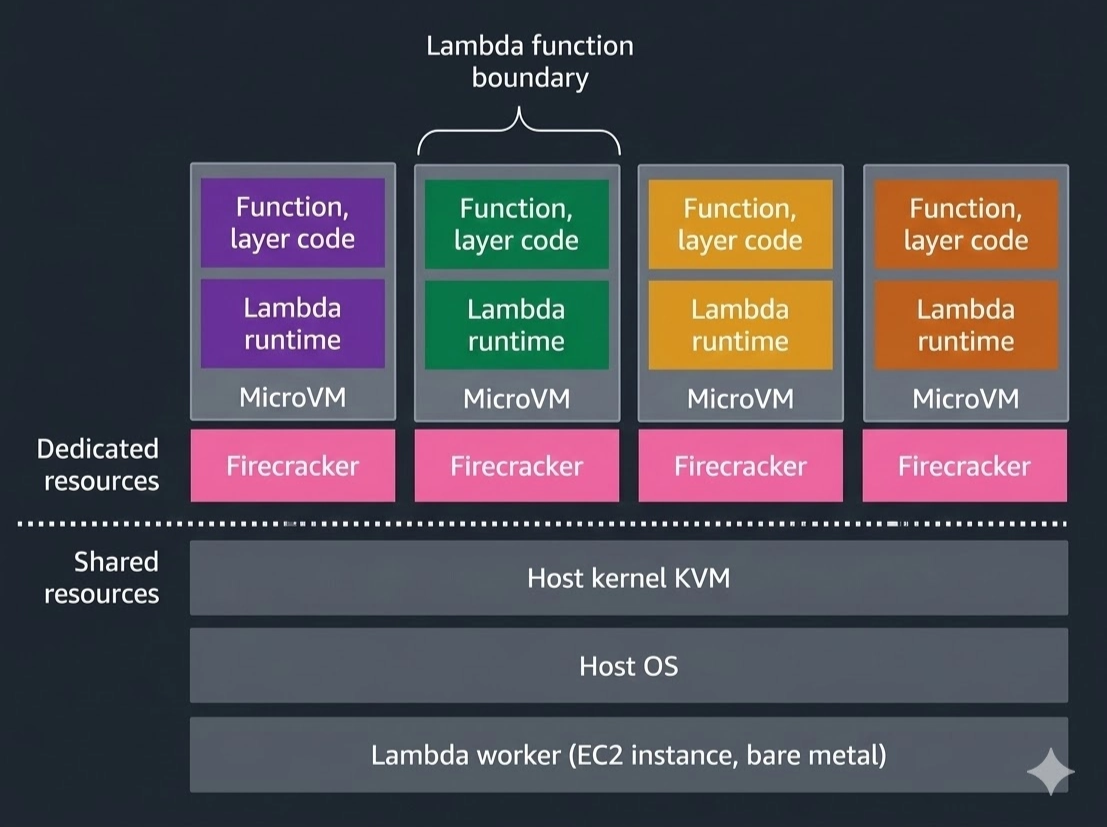
AWS Lambda Execution Environment:
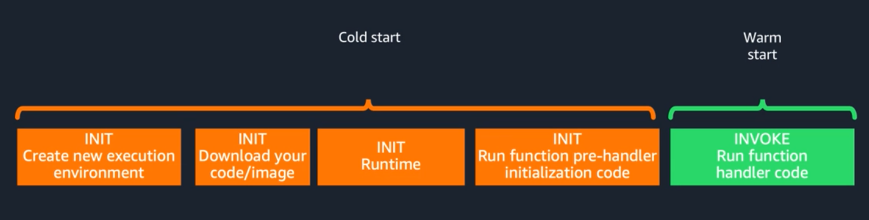
Occurs on the first call ⇒ Subsequent runs are warm starts
When implementing with Lambda, you need to optimize your cold start
Lambda concurrency:
- What if it executes in parallel? Initially, it will only support one event
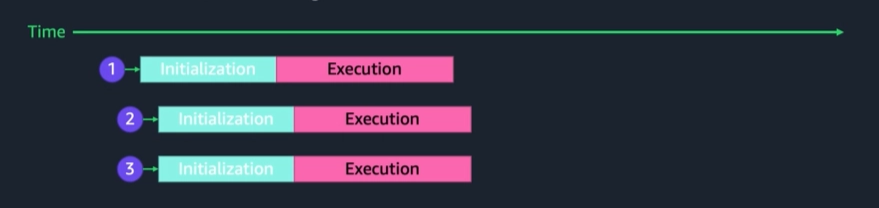
For example, at the initial moment, there are 3 requests calling Lambda simultaneously.
Since no execution environment exists yet, Lambda must create 3 new environments.
Process for each request:
Initialization: create environment, load runtime, and load function code
Execution: Run function
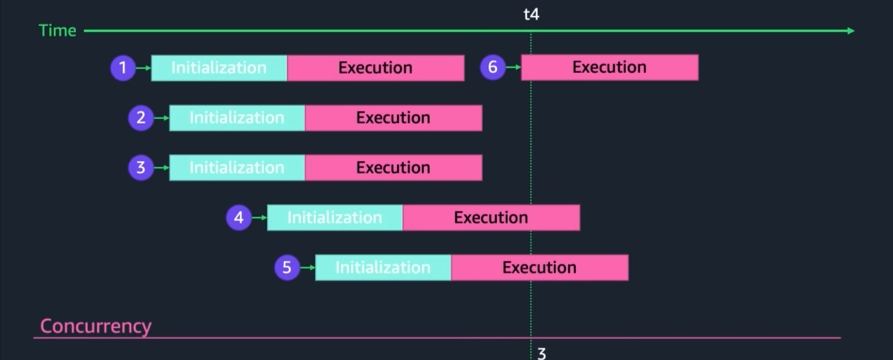
After Lambda has been running for a while and the execution environments have been created, Lambda retains these environments in memory.
New requests can reuse the old environments. For example, Requests 1-5 create 5 environments, and by the 6th request, Lambda reuses an existing environment (no need for Initialization -> direct Execution [Warm Start]).
Provisioned concurrency:for instance, initialize 20 environments → configure to retain 10 environments to use those 10 for subsequent calls → maintain warm start.Reserved Concurrency:the opposite of the concept of provisioned concurrency = the maximum number of Lambdas that can run in parallel for a function. It's like reserving a slot to run Lambda for that function. If there are 3 invocations, the first 2 are okay, but the 3rd gets throttled (if sent synchronously, the request fails; asynchronously, it will retry).
Cold Start - Execution Environment:
The speed of my function depends on the cold start.
A cold start can occur when hardware fails or after a scaling phase, requiring resources to be rebalanced from different availability zones.
The facts:
<1% of production workloads
Varies from <100ms to >1s
Cold starts occur when:
The environment is reaped
Failure in underlying resources
Rebalancing across AZs
Updating code/config flushes
Scaling up: Sometimes upgrading code/config leads to scaling up, resulting in a cold start
Influenced by:
Memory allocation
Size of function package
How often a function is called
Internal algorithms
Solutions:
Optimize dependencies to only the necessary modules
Don't load if you don't need it
Establishing connections: should not place connections outside the Lambda but can use them in the initialization phase of the Lambda
Use provisioned concurrency
Optimize Dependencies:
Only use libraries that are specific to your workload
// const AWS = require('aws-sdk')
const DynamoDB = require('aws-sdk/clients/dynamodb') // 125ms faster

// const AWSXRay = require('aws-xray-sdk')
const AWSXRay = require('aws-xray-sdk-core') // 5ms faster

// const AWS = AWSXRay. captureAWS(require('aws-sdk'))
const dynamodb = new DynamoDB. DocumentClient()
AWSXRay. captureAWSClient(dynamodb.service) // 140ms faster
Provisioned Concurrency:
| On-demand pricing (us-east-1) | |
|---|---|
| Requests | $0.20 per 1M requests |
| Invocation Duration | $0.0000166667 per GB-second |
| Provisioned Concurrency pricing (us-east-1) | |
|---|---|
| Requests | $0.20 per 1M requests |
| Provisioned Concurrency | $0.0000041667 per GB-second |
| Invocation Duration | $0.0000097222 per GB-second |
Maintaining 10 environments [warm start] for a month costs about $19 → AWS will then initialize around 10 environments.
On demand vs Provisioned Concurrency, x86:
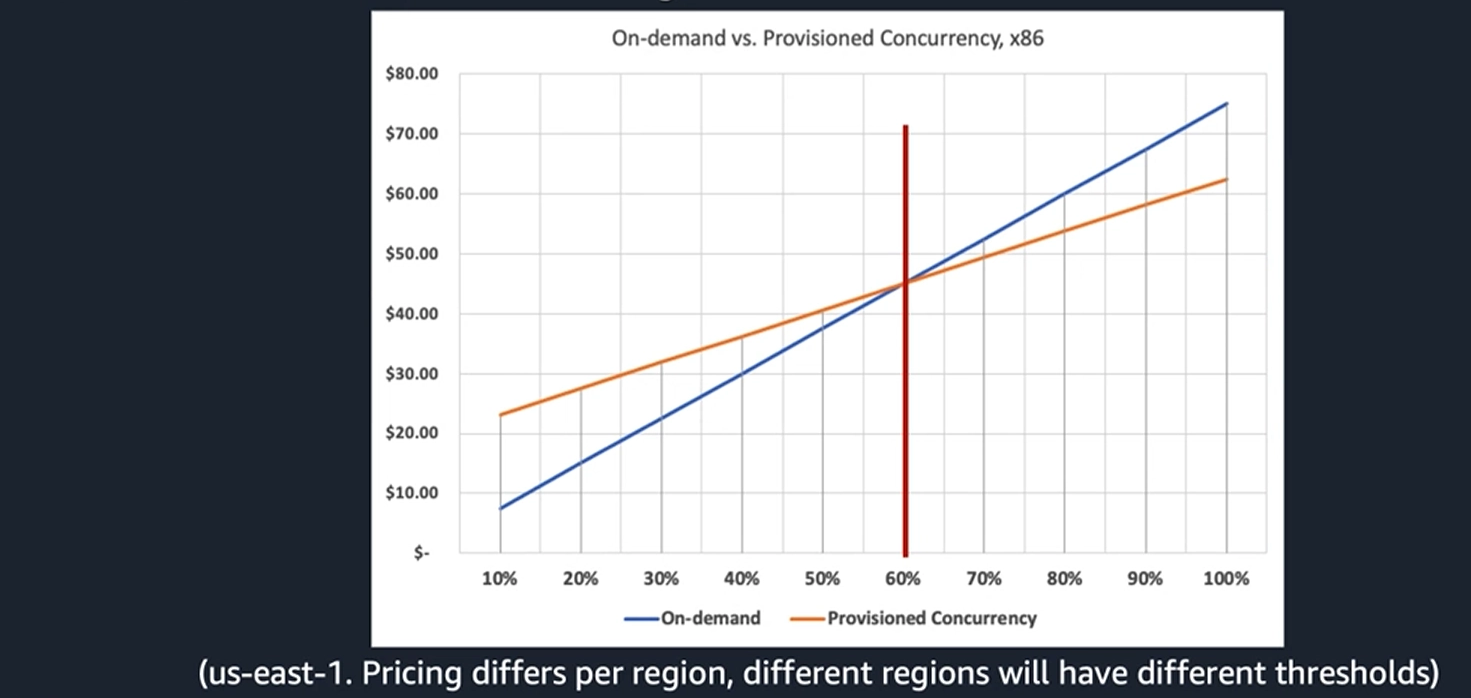
- If application traffic is low, provisioned will be expensive → but when traffic reaches millions → 16% cheaper
Analyze traffic patterns → Apply fixed levels for stability → Automate for cost optimization
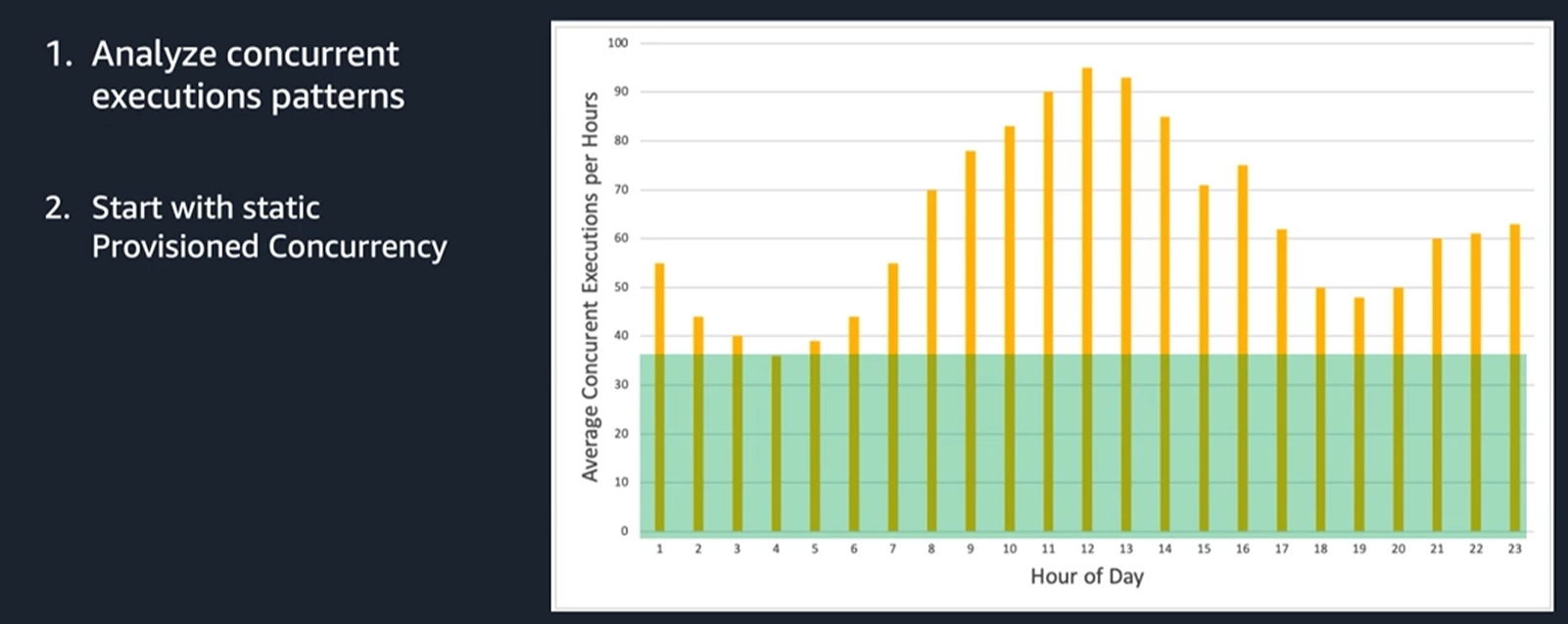
The image illustrates setting a fixed level of available resources (green section) throughout the day.
Analysis: The green level represents the amount of Lambda functions kept "warm" to avoid Cold Start delays.
The yellow columns above the green area are handled by On-demand Concurrency (running based on actual demand).
Advantages: Simple, ensures a minimum amount of resources is always ready to respond immediately.
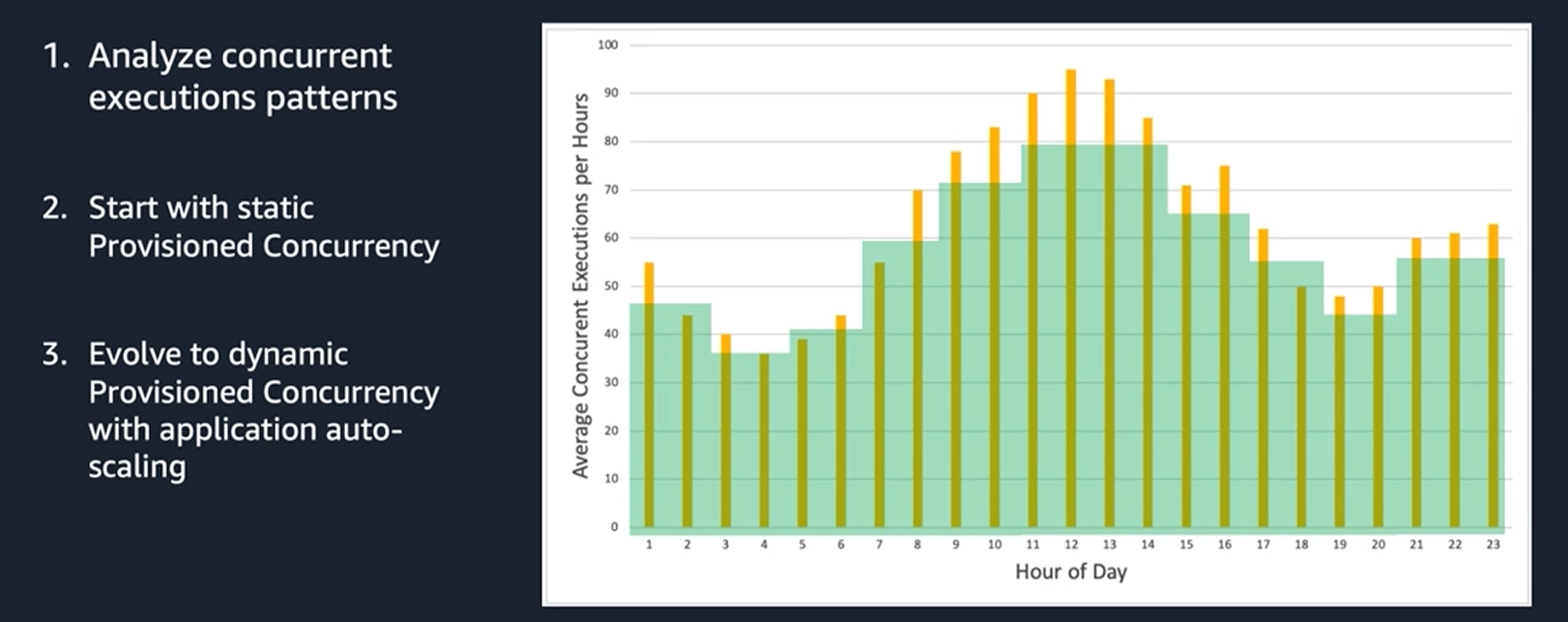
Upgrade to auto-scaling available resources based on actual hourly traffic patterns:
Analysis: The current green area "tracks" the yellow columns. When demand is high (midday), the system automatically increases readiness; when demand is low (night), it automatically decreases
Advantages: Thorough cost optimization by avoiding payment for excess resources during low demand, while minimizing Cold Start during peak hours
Lambda pricing:
Based on memory and execution time
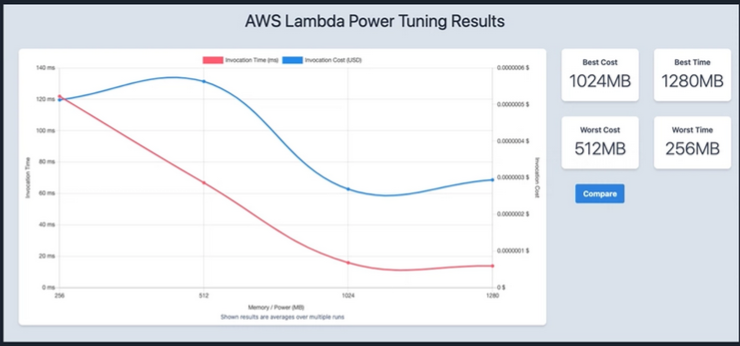
AWS Lambda Power Tuning: Application for testing
Finding the right balance between cost and execution time
Increasing the Lambda function memory configuration also scales the allocated CPU
AWS Lambda Power Tuning can help optimize your Lambda functions for cost and/or performance in a data-driven way
Option to find the right CPU architecture
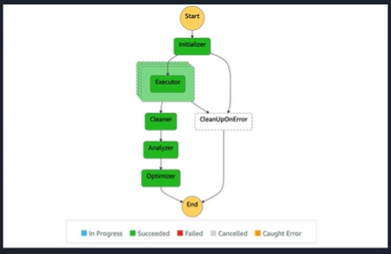
Example:
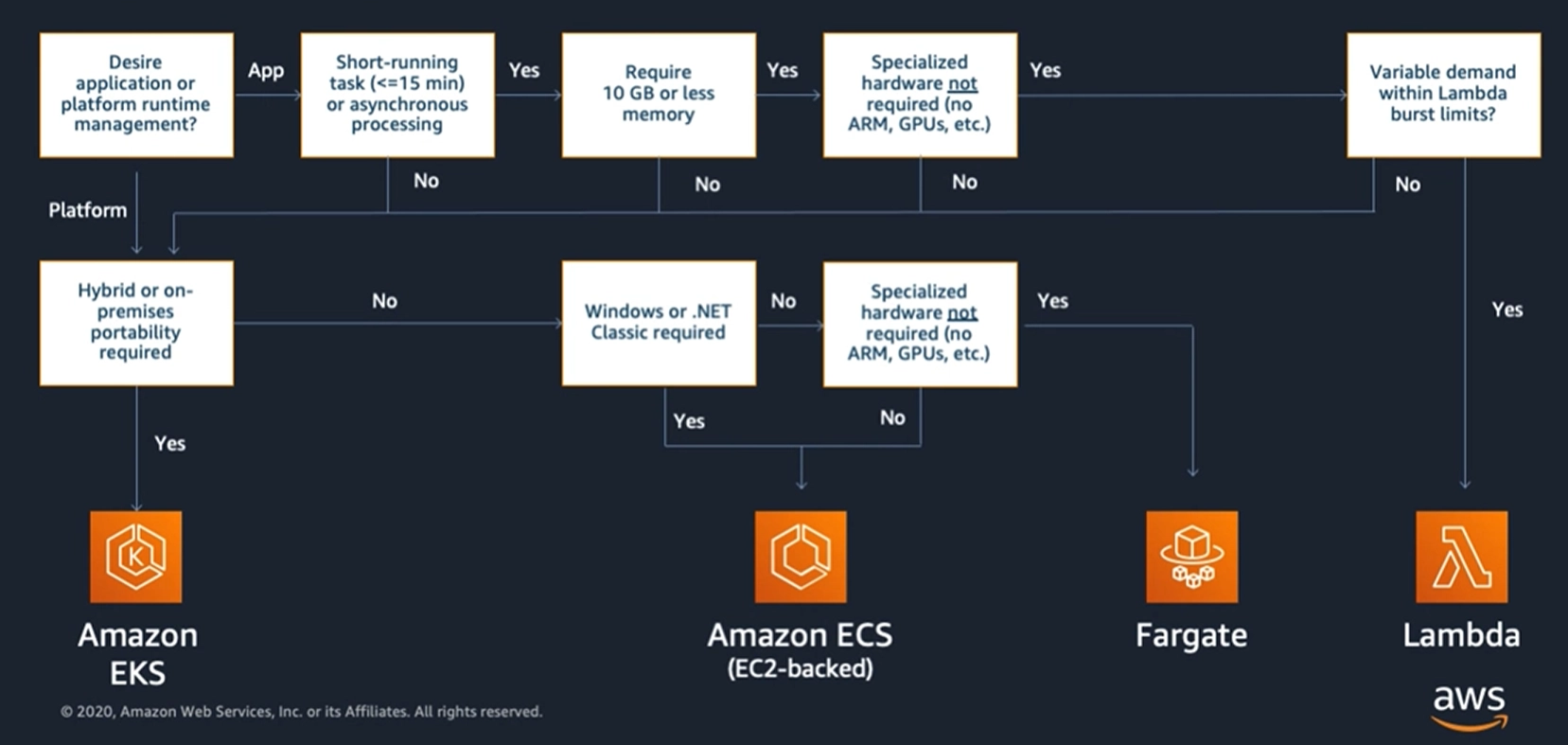
Decision tree to use Lambda:
How many times have you asked yourself when to use Lambda, containers, ECS, EC2, Fargate, or EKS?
First, if you want to run your application
both on-premises and in the cloud→EKSIf you’re not running hybrid, using Windows or .NET without hardware support(ARM, GPU, etc.), then go withFargateIf you need to use AI for heavy processingand require a lot of CPU, you might chooseEC2If on-prem is not needed→ and there are no special hardware requirements, you can chooseFargate(supports up to 128 GB). 99% of the time,Fargatecan be used (as a serverless solution, you don’t need to worry much about infrastructure)Organizations favor Fargatebecause itcomplies with security regulations(when infrastructure needs upgrading, many rules must be followed)No need to go all in → you can combine them
API Gateway:
In serverless architecture, Lambda contains business logic in the form of small functions
To expose Lambda functions externally as a Web API, we use API Gateway
API Gateway acts as an intermediary and security layer, handling requests from clients before invoking Lambda
This service is fully managed and serverless, allowing you to build APIs without managing servers
Types of API GW:
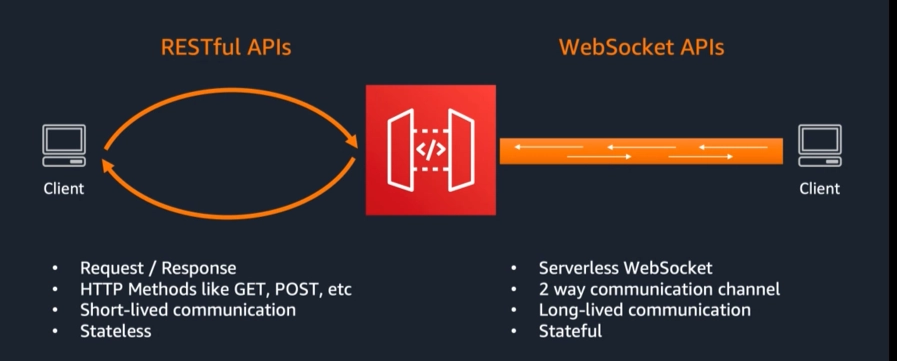
Restful APIs:
Request/Response
HTTP Methods like GET, HEAD, POST, OPTIONS, DELETE
Short-lived communication
Stateless
Divided into two more types:
RESTful APIs types:
1. REST API (v1)
Feature-rich
Supports advanced configurations like request transformation, API keys, usage plans, caching, etc
Suitable for systems requiring extensive control and advanced features
2. HTTP API (v2)
Built from the ground up to optimize for serverless workloads
Faster—up to 60% faster
Lower cost—up to 71% cheaper
Easier to configure and use
Notes:
Currently, REST API still has more features, and some of those features are not yet fully available in HTTP API
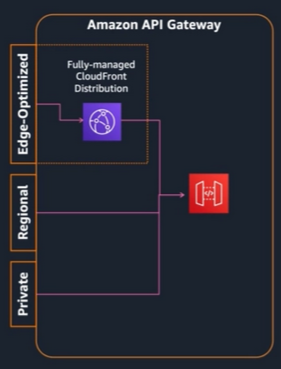
Endpoint types:
REST Edge-Optimized:
Utilizes CloudFront to reduce TLS connection overhead (reduces roundtrip time)
Designed for a globally distributed set of clients
Regional:
Recommended API type for general use cases
Designed for building APIs for clients in the same region
Private (REST):
Only accessible from within VPC (and networks connected to VPC)
Designed for building APIs used internally or by private microservices
Supported Protocols
RESTful APIs
Request / Response
HTTP Methods like GET, POST, etc
Short-lived communication
Stateless
WebSocket APIs:
Two-way connection, like chatting or phone calls
Stateful
Long-lived communication
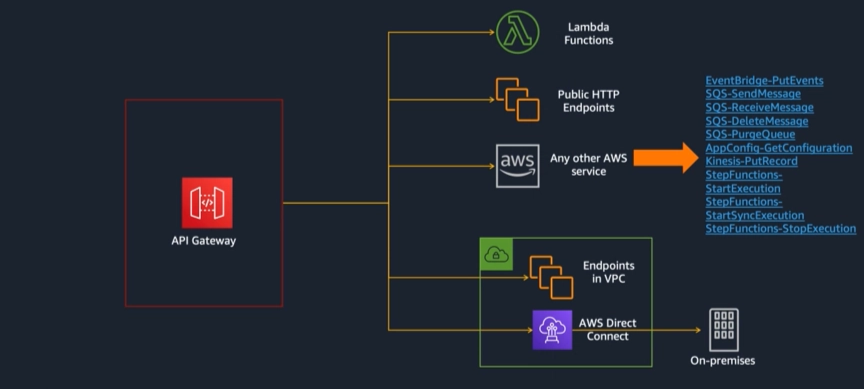
Pattern #1: API with AWS services
API Gateway supports a wide range of different services
Runs hybrid API Gateway + Endpoint in VPC + AWS Direct Connect
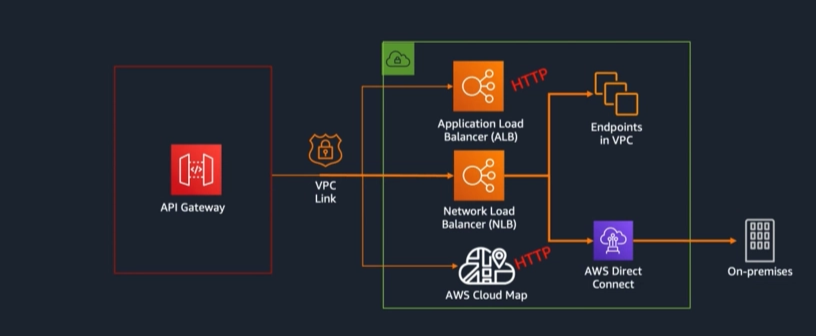
Pattern #2: Private Integrations - VPC Link
Pattern #3: More complex architecture
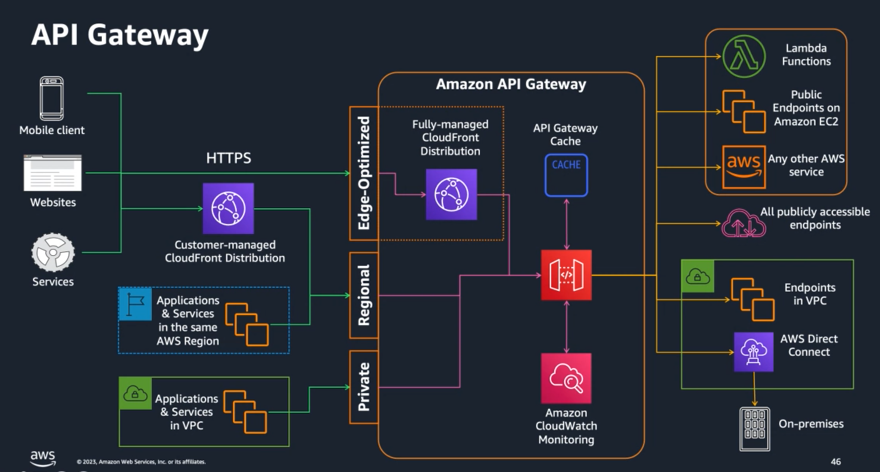
- API Gateway can also support caching
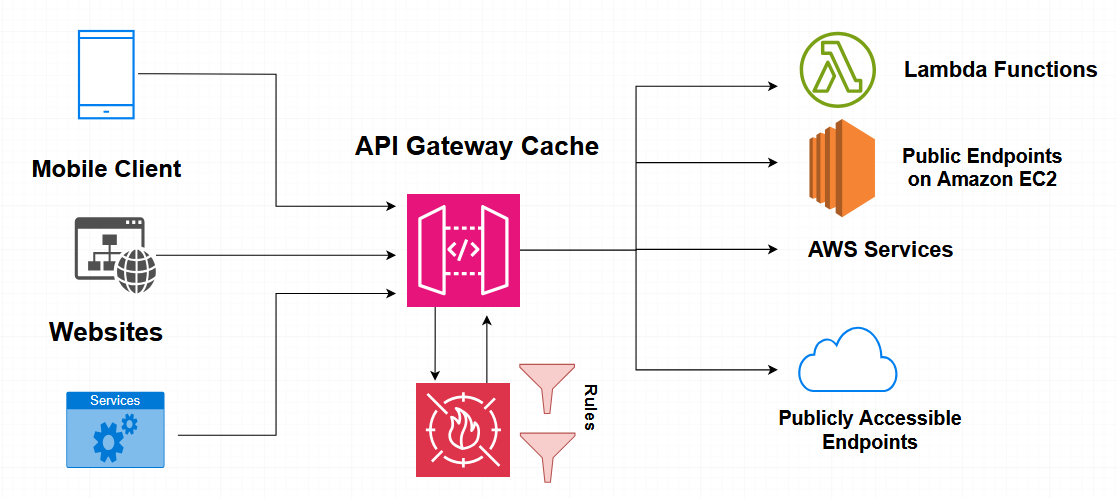
API Gateway protection mechanisms:
- Typically, I would be concerned with WAF (Web Application Firewall, where I can use third-party rules)
Types of authorization:
Resource Policy
(REST)Mutual TLS
WAF
(REST)Cognito User Pools
(REST)JWT
(HTTP)IAM
Lambda Authorizer
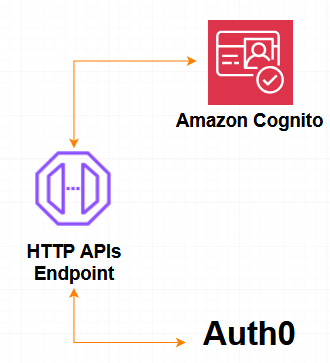
- Can integrate with Cognito: SAML, OAuth2, … third party
Resource Policies (REST API):
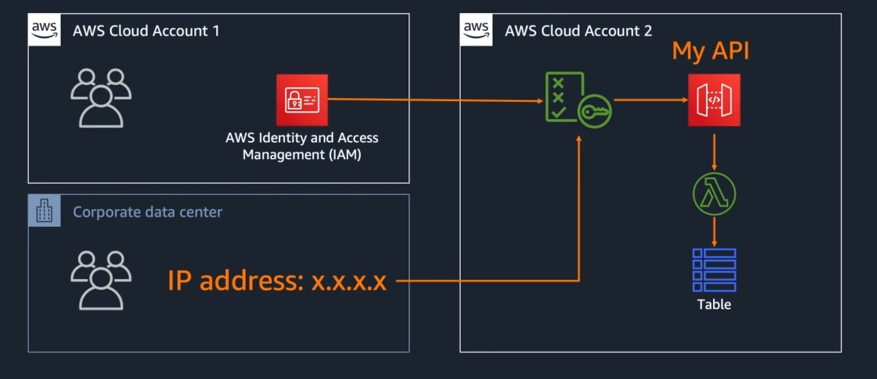
Resource policies allow an API Gateway REST API to control who can invoke the API based on AWS accounts or source IP addresses before the request reaches the backend services.
Web Application Firewall (WAF):
JWT/Cognito authorizer:
OAuth2 compliant (part of OpenID Connect - OIDC)
Allows or denies access based on token validity and optional scopes .
Any required scopes for the route are validated in the token
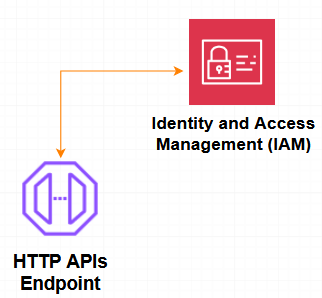
IAM Authorizer:
Clients must use Signature Version 4 to sign their requests with AWS credentials
The authorization token is decoded . User is verified against the Identity & Access Management (IAM) service
User must have execute-api access on the route to proceed
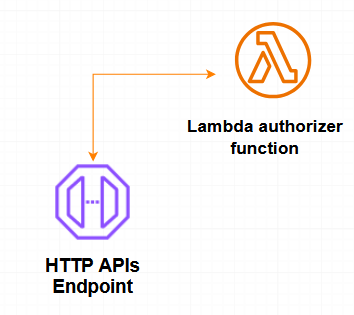
Lambda authorizer:
Your custom logic to validate the request
2 payload options:
Payload 1: must return an IAM policy that allows or denies access to your API route
Payload 2: can return IAM policy or Boolean
Authorization can be cached
Throttling and usage plans:
Protect backend systems
Prevents one customer from consuming all your backend system's capacity
Let you decide how to allocate capacity among your API consumers with quotas and request rates.
Example:
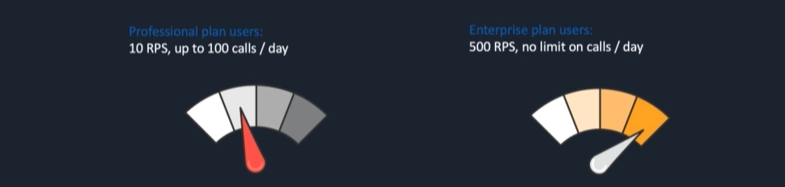
I can configure usage plans for different clients, similar to business subscriptions with multiple tiers.
If API calls exceed the limit, throttling will occur.
Four levels of Throttling:
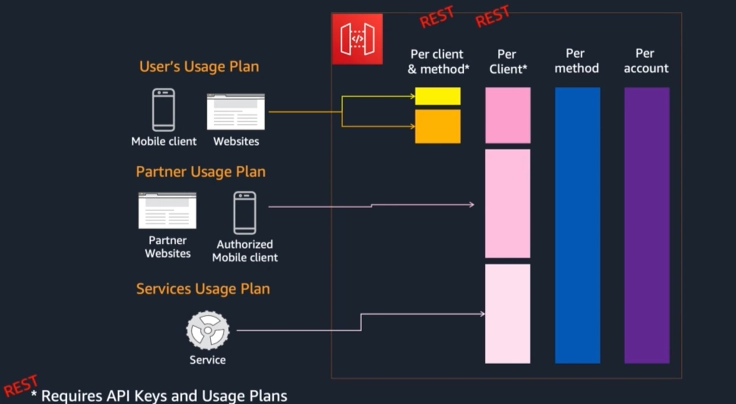
1. User Classification (Usage Plans)
The system categorizes users into different groups with varying priority levels:
User’s Usage Plan: For general users (Web/Mobile)
Partner Usage Plan: For strategic partners (usually with higher limits)
Services Usage Plan: For internal or system services.
2. Control Layers (Throttling Levels)
The flow goes from left to right, and if any layer's limit is exceeded, the request will be blocked (error 429 Too Many Requests):
Per client & method (Yellow/Orange): The most detailed limit. For example, a specific user can only call the "Login" function 5 times per second.
Per Client (Pink): The total limit for a user (based on API Key), regardless of which function they are calling.
Per method (Blue): The limit for an entire function (API Method). For example, everyone worldwide can call the "Search" function a maximum of 1000 times per second.
Per account (Purple): The highest limit at the AWS account level to ensure your entire infrastructure doesn't crash.
Usage Plans and API Keys:
API Keys
Alphanumeric string values that you distribute to clients (per user/client)
Generated by API Gateway or you can imported from a CSV file
Use API keys together with Usage Plans or Lambda authorizers to control access to your APIs
Usage Plans
Specifies who can access API stages and methods
How much and how fast they can access the resource
Rate limit
Quota limit
Uses API keys to identify API clients
Stages:
API Gateway enables you to set stage variables, allowing the same API to point to different backends.
Your APIs are versioned and can be rolled back.
APIs are deployed to staging environments.
You choose what to name them.
For example, these environments:
Dev (e.g., example.com/dev)
Beta (e.g., example.com/beta)
Prod (e.g., example.com/prod)
Canary Releases (REST):
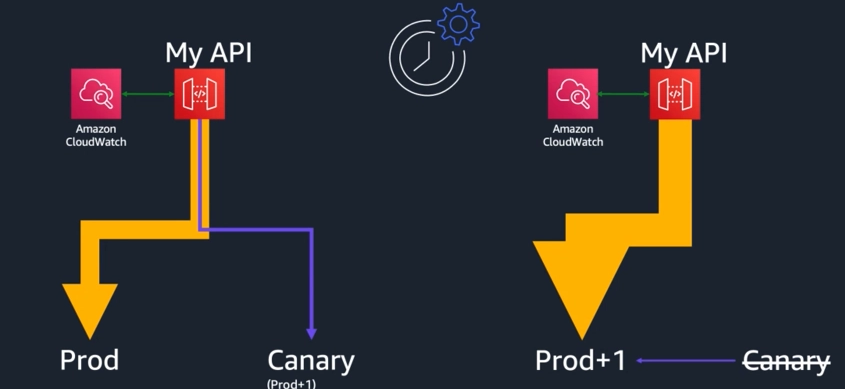
Canary Releases: của các big tech
With the same API Gateway, traffic gradually shifts from the prod environment to production + 1 environment
Caching (REST):
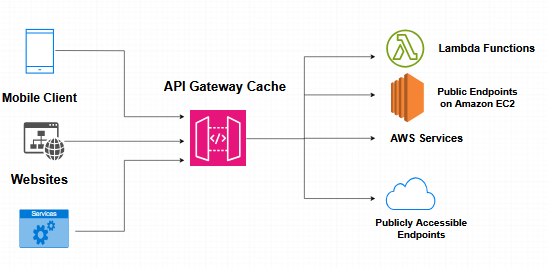
Effective for quick responses and minimizing load to your backend
Leverage cache keys to optimize response
- Path, headers, query strings
Can be set up per Stage or Method
SAM:
to be continued ... :D


